Qualcomm Interview Prep — 07. Embedded Systems, Linux Kernel & Drivers¶
Scope. This file owns the systems-below-the-app layer: the user-space/kernel-space split and every channel across it (syscalls,
ioctl,/proc,/sys, netlink,mmap,copy_to_user/copy_from_user); device drivers (character/block/network, thefile_operationstable, writing/compiling a kernel module, compiling the kernel); interrupts and ISRs (top/bottom half, tasklets, workqueues); RTOS vs Linux scheduling and real-time constraints; watchdogs; the bootloader/boot sequence; embedded memory (flash/SIM); buses (I2C/SPI/UART) and DMA/MMIO; the Android stack (HAL, Binder, zygote, init); cross-compilation/toolchains; and kernel debugging (dmesg/printk/ftrace). Pure-C pointer/volatile/endianness mechanics live in01_c_programming.md; OS theory (processes vs threads, scheduling algorithms, virtual memory/paging, mutex/semaphore/deadlock, IPC) lives in04_os.md; ISP/camera-pipeline domain detail in05_camera_isp_multimedia.md; bit/number representation and bus/cache hardware depth in09_computer_arch_digital_design.md. Overlaps are cross-linked, not duplicated.How to read each entry. Every question is answered in layers so you can stop at the depth you need: - Q — the question, phrased as interviewers actually ask it. - Frequency — how often it (or its theme) showed up in the 75 collected reports (tier + approximate count). - Concept — the basis — book-style fundamentals with worked examples and, where it helps, an SVG diagram. - The "wh"s — Why it exists (the problem it solves), Where you see it (real Qualcomm/camera/SoC/modem situations), and any important caveat. - Answer — a tight, say-it-out-loud interview answer. - Solution / good example — for "how do you implement/handle/design X" questions, a complete, copy-pasteable pattern. - Follow-ups / gotchas — the traps interviewers spring next. - Seen in — the source reports.
Terms in bold-italics like ioctl, HAL, ISR, tasklet, workqueue, zygote, watchdog are defined in the § Encyclopedia at the bottom — search there for any keyword.
Frequency legend (sample = 75 collected interview reports; counts are approximate and partly from aggregator pages, so treat them as directional): 🔥🔥🔥 Very common (~8+ reports) · 🔥🔥 Common (~4–7) · 🔥 Occasional (~2–3) · ◽ Foundational (rarely asked verbatim, but assumed and underpinning everything else).
Why this topic dominates the Qualcomm loop. Qualcomm ships SoCs (Snapdragon), modems, and the software at the metal that drives them — camera/ISP drivers, Android camera HALs, RTOS firmware on the DSP/sensor MCUs, and the Linux kernel that ties it together. The kernel/embedded loop is explicitly heavy: multiple reports describe rounds on "kernel↔user-space↔HAL," "Linux module development," "how to compile the Linux kernel," watchdogs, ISRs, priority inversion, and pthreads. Evidence base: qualcomm_camera_interview_experiences.md.
Table of contents¶
- A. User space, kernel space & the boundary — A1 user vs kernel space · A2 kernel↔user-space channels · A3
copy_to_user/copy_from_user· A4ioctl· A5 syscalls & memory-mgmt syscalls · A6 user app on a kernel-less system - B. The HAL & Android architecture — B1 what a HAL is & why · B2 kernel↔HAL comm · B3 Android architecture (init/zygote/Binder) · B4 zygote
- C. Device drivers — C1 char vs block vs network · C2
file_operations· C3 write & compile a kernel module · C4 compile the kernel - D. Interrupts & ISRs — D1 what is an ISR / why short · D2 top half vs bottom half (tasklet/workqueue) · D3 software interrupts & types
- E. RTOS, real-time & watchdogs — E1 RTOS vs OS · E2 RTOS vs Linux scheduling · E3 priority inversion · E4 software vs hardware watchdog
- F. Boot, memory & toolchains — F1 boot sequence & bootloader · F2 SIM/flash/embedded memory · F3 cross-compilation & toolchains
- G. Buses, DMA & MMIO — G1 I2C vs SPI vs UART (camera control vs data) · G2 DMA & memory-mapped I/O · G3
volatilein drivers · G4 endianness in embedded - H. Concurrency in embedded & kernel debugging — H1 pthreads (create/join/mutex) · H2 kernel debugging from logs (dmesg/printk/ftrace)
- § Encyclopedia — searchable glossary
- § Last-5-minutes cheat sheet
A. User space, kernel space & the boundary¶
A1 · Q: What is the difference between user space and kernel space?¶
Frequency: 🔥🔥🔥 Very common (~8 reports) — asked directly ("What is User space and kernel space?", "user mode and kernel mode concepts") and assumed by every driver/HAL question.
Concept — the basis. A modern CPU runs in (at least) two privilege levels. Kernel space is the privileged level (ring 0 on x86, EL1 on ARM): code there can execute privileged instructions, touch any physical memory, program the MMU, talk to hardware, and handle interrupts. User space is the unprivileged level (ring 3 / EL0): an ordinary process can only touch its own virtual memory and cannot run privileged instructions or access hardware directly. The kernel runs once, shared; each process has its own isolated user-space address space.
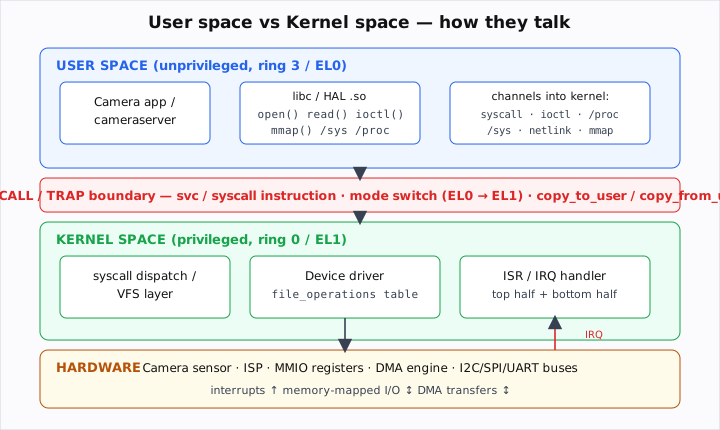
Example — the same address means different things, and crossing costs a mode switch:
/* user space: this is just a normal function call, no privilege change */
size_t n = strlen(buf);

/* user space → kernel space: read() is a SYSCALL — it traps into the kernel,
   switches to kernel mode, the kernel does the privileged I/O, then returns. */
ssize_t k = read(fd, buf, 4096);   /* the 'svc'/'syscall' instruction crosses the boundary */
Why it exists. Protection and isolation. If any process could touch hardware or other processes' memory, one bug (or one malicious app) could crash or compromise the whole device. The split puts the trusted, privileged code (the kernel) behind a guarded door, and forces everything else to ask via a controlled interface. The hardware (MMU + privilege bits) enforces it, so a user-space bug faults (segmentation fault) instead of corrupting the kernel.
Where you see it (Qualcomm). The camera app and cameraserver run in user space; the V4L2/sensor/ISP drivers run in kernel space; they meet at the syscall/ioctl boundary. Understanding the split explains why a HAL can't poke a register directly — it must ioctl a driver — and why a crash in the camera app doesn't take down the phone.
Answer. "User space is the unprivileged CPU mode where ordinary processes run, each in its own isolated virtual address space — they can't touch hardware or other processes directly. Kernel space is the privileged mode where the OS kernel, drivers, and interrupt handlers run with full access to hardware and memory. The split exists for protection and isolation, enforced by the MMU and CPU privilege levels. To get a privileged service, user code traps into the kernel via a system call, which switches mode — that's the only sanctioned crossing."
Follow-ups / gotchas. A mode switch (user→kernel) is not a context switch (process→process) — see 04_os.md. The kernel can read user memory only through copy_*_user (A3), never by dereferencing a raw user pointer. A "user app on a system with no kernel" (A6) removes the boundary entirely — your code is the privileged level.
Seen in: SDE off-campus 2023 ("What is User space and kernel space?"), SW Engineer kernel/embedded (kernel↔user-space comm), University grad ("user mode and kernel mode concepts").
A2 · Q: How does the kernel communicate with user space? (List the channels.)¶
Frequency: 🔥🔥🔥 Very common (~4–5 reports) — "How does the kernel communicate with user space?" appears repeatedly in kernel/embedded loops.
Concept — the basis. There is no shared pointer between the two sides; the kernel exposes a small set of well-defined channels, each suited to a different shape of data:
| Channel | Direction / shape | Typical use |
|---|---|---|
| System calls | request/response, synchronous | the base mechanism: read/write/open/mmap |
| ioctl | device-specific command + small struct | driver control: set gain, query caps (camera/V4L2) |
/proc |
text files, mostly kernel→user status | /proc/meminfo, /proc/interrupts, process info |
/sys (sysfs) |
one-value-per-file, read and write | device attributes, tuning knobs, GPIO, clocks |
| netlink | async, bidirectional socket, can broadcast | networking config, uevents (hotplug), modem |
| mmap | shared memory — zero-copy | map a device buffer / DMA frame into the app |
signals / eventfd / poll |
async notification | "data ready," wakeups |
copy_to_user/copy_from_user |
the primitive under all the above | safely move bytes across the boundary (A3) |
Example — the four most-asked channels in one breath:
ioctl(fd, VIDIOC_S_CTRL, &ctrl);             // ioctl: command a driver
int fd2 = open("/sys/class/leds/led0/brightness", O_WRONLY); write(fd2,"1",1); // sysfs
void *p = mmap(0, len, PROT_READ, MAP_SHARED, fd, 0);   // mmap: zero-copy share a buffer
FILE *f = fopen("/proc/interrupts","r");     // /proc: read kernel status as text
Why it exists. Different data has different needs: a one-off "set this register" is a perfect ioctl; exposing a single tunable as a file you can cat/echo is perfect sysfs; streaming a 12 MB frame with no copy demands mmap; asynchronous, broadcast-style events (a device appeared) fit netlink. One generic syscall couldn't serve all of them cleanly, so the kernel offers a toolbox.
Where you see it (Qualcomm). Camera control rides ioctl on /dev/videoX / /dev/v4l-subdevX; frame buffers are shared by mmap (or dma-buf) so the ISP output reaches user space with zero copy; /sys exposes sensor/clock/thermal knobs; /proc/interrupts and dmesg help debug an IRQ storm; netlink uevents notify when a device node appears.
Answer. "The kernel exposes user space through a handful of channels: plain system calls (read/write/open), ioctl for device-specific control commands, the /proc and /sys virtual filesystems for status and tunable attributes, netlink sockets for asynchronous/broadcast events like hotplug and networking, and mmap for zero-copy shared memory. Underneath all of them, the kernel moves the actual bytes with copy_to_user/copy_from_user, which validate the user pointer. For camera work it's mostly ioctl for control and mmap/dma-buf for the frame data."
Follow-ups / gotchas. "Why not just dereference the user pointer in the kernel?" → it may be invalid, swapped out, or malicious; you must go through copy_*_user (A3). /proc is historically for process info but accreted lots of kernel knobs; /sys is the modern, structured place for device attributes. mmap is fastest (no copy) but you then need synchronization/cache management.
Seen in: SW Engineer kernel/embedded ("How does the kernel communicate with user space?"), SDE off-campus 2023, University grad (memory-management syscalls), Engineer experienced (IPC theory).
A3 · Q: How do you safely move data between kernel and user space? (What do copy_to_user/copy_from_user do, and what do they return?)¶
Frequency: 🔥 Occasional (~2 reports) — the implementation detail behind every driver read/write/ioctl; "memory-management system calls" and driver questions imply it.
Concept — the basis. Inside the kernel you must never trust or directly dereference a user-space pointer. It might point outside the process's mapped memory, be paged out, or be a deliberate attack to make the kernel read/write somewhere privileged. So the kernel provides two helpers that validate the address range and copy carefully:
- unsigned long copy_to_user(void __user *to, const void *from, unsigned long n) — kernel → user.
- unsigned long copy_from_user(void *to, const void __user *from, unsigned long n) — user → kernel.
The return value is the number of bytes that could not be copied — 0 means full success; nonzero means a fault occurred partway and you should return -EFAULT. (Older code calls access_ok() first to validate the range; modern kernels fold that check in.)
Example — a correct character-driver read and an ioctl arg copy:
static ssize_t cam_read(struct file *f, char __user *ubuf, size_t n, loff_t *off) {
    char kbuf[256];
    size_t len = min(n, sizeof kbuf);
    fill_kbuf(kbuf, len);                       // produce data in kernel memory
    if (copy_to_user(ubuf, kbuf, len))          // returns #bytes NOT copied
        return -EFAULT;                         // user pointer was bad
    return len;                                 // bytes successfully delivered
}

static long cam_ioctl(struct file *f, unsigned int cmd, unsigned long arg) {
    struct cam_ctrl c;
    if (copy_from_user(&c, (void __user *)arg, sizeof c))   // pull the struct in safely
        return -EFAULT;
    apply_gain(c.gain);
    return 0;
}
Why it exists. It is the single most important security/robustness boundary in the kernel. A naive *user_ptr dereference would be an arbitrary kernel read/write primitive — the dream of every exploit. copy_*_user confines all crossing to audited code that checks the pointer belongs to the calling process and handles page faults gracefully (returning an error instead of oopsing).
Where you see it (Qualcomm). Every camera/V4L2 ioctl that takes a control struct uses copy_from_user to pull it in and copy_to_user to hand results back; a driver that returns metadata or capabilities copies it out the same way. Getting the return-value check wrong (treating nonzero as bytes-copied) is a real bug interviewers like to probe.
Answer. "Kernel code can't trust a raw user pointer — it could be invalid, paged out, or hostile — so it uses copy_to_user and copy_from_user, which validate the user address range and copy with fault handling. Both return the number of bytes that could not be copied: zero means success, nonzero means a fault, and you return -EFAULT. They're the primitive under every driver read/write/ioctl that crosses the boundary."
Follow-ups / gotchas. Return value is bytes-not-copied, not bytes-copied — invert your mental model. For single scalars there are faster get_user/put_user. __user is a Sparse annotation marking pointers that live in user space (caught at static-analysis time). You can't call these from atomic/interrupt context if they might sleep (page-fault) — another reason ISRs don't copy to user (D1).
Seen in: University grad ("memory management system calls"), SW Engineer kernel/embedded (kernel↔user-space comm); standard driver expectation.
A4 · Q: What is ioctl and why use it instead of read/write?¶
Frequency: 🔥🔥 Common (~4 reports) — the user↔driver control channel; implied by every "camera driver" / "kernel↔user-space" discussion and cross-referenced from 01_c_programming.md G1.
Concept — the basis. ioctl ("I/O control") is a system call — int ioctl(int fd, unsigned long request, ...) — for device-specific operations that don't fit the read/write byte-stream model. read/write move opaque bytes; but a camera driver needs commands like "set exposure," "start streaming," "query supported formats." Each such command is encoded as a request number (usually built with the _IOR/_IOW/_IOWR macros that pack direction + size + a magic number), optionally with a pointer to a struct of arguments.
Example — the canonical pattern (and how V4L2 does it):
/* shared header (kernel + user): define the command numbers */
#define CAM_MAGIC 'c'
#define CAM_SET_GAIN  _IOW(CAM_MAGIC, 1, struct cam_ctrl)   // user → kernel
#define CAM_GET_INFO  _IOR(CAM_MAGIC, 2, struct cam_info)   // kernel → user

/* user space */
struct cam_ctrl c = { .gain = 8 };
ioctl(fd, CAM_SET_GAIN, &c);
/* real camera: */ ioctl(fd, VIDIOC_STREAMON, &type);       // V4L2 "start streaming"
Why it exists. The Unix "everything is a file" model is elegant for streams but too narrow for the control plane of real hardware. ioctl is the escape hatch: an open-ended, per-driver command channel that reuses the existing file-descriptor security/namespace machinery (you must open() the device, so permissions still apply) without inventing a new syscall per device.
Where you see it (Qualcomm). V4L2 (VIDIOC_*), media controller, and DRM/KMS are all ioctl-driven — it is the way the camera/display user-space talks to kernel drivers (set format, queue/dequeue buffers, stream on/off). Bring-up and debugging revolve around getting these ioctls right.
Answer. "ioctl is a system call for device-specific control operations that don't fit the read/write byte-stream model — things like 'set gain,' 'start streaming,' or 'query capabilities.' You pass a file descriptor, a command number (encoded with direction and arg size via _IOR/_IOW/_IOWR), and usually a pointer to a struct that the driver pulls in with copy_from_user. It's the user-space-to-driver control channel — V4L2 and DRM are built entirely on it."
Follow-ups / gotchas. ioctl is sometimes criticized as un-typed/ad-hoc — hence newer interfaces (netlink, sysfs) for some uses — but it remains dominant for media. The driver entry point is .unlocked_ioctl in file_operations (the old .ioctl held the BKL and is gone). 32-bit user on a 64-bit kernel needs .compat_ioctl. Always validate cmd and copy_from_user the arg.
Seen in: Cross-ref 01_c_programming.md G1 ("ioctl() is how user-space talks to a kernel driver"); camera-driver/V4L2 context throughout the camera loop (CleverPrep camera guide, SW Engineer kernel/embedded).
A5 · Q: What is a system call? What are the memory-management system calls?¶
Frequency: 🔥🔥 Common (~5 reports) — "What are system calls?", "Different System calls and why we use them", "memory-management system calls".
Concept — the basis. A system call is the controlled entry point from user space into the kernel to request a privileged service. The C library wraps each one; calling it executes a special trap instruction (svc on ARM, syscall on x86-64) that switches to kernel mode, runs the handler, and returns. Categories:
| Category | Examples |
|---|---|
| Process control | fork, execve, exit, wait, clone |
| File / device I/O | open, read, write, close, ioctl, lseek |
| Memory management | mmap, munmap, mprotect, brk/sbrk |
| IPC | pipe, socket, shmget, msgget, semop |
| Info / time | getpid, gettimeofday, uname |
The memory-management ones specifically: brk/sbrk grow/shrink the heap's data segment; mmap maps files or anonymous memory (and is what malloc uses for large blocks); mprotect changes page permissions; munmap unmaps.
Example:
void *p = mmap(NULL, 4096, PROT_READ|PROT_WRITE,
               MAP_PRIVATE|MAP_ANONYMOUS, -1, 0);  // ask the kernel for a page
mprotect(p, 4096, PROT_READ);                       // make it read-only
munmap(p, 4096);                                    // give it back
Why it exists. Memory, like all hardware, is a shared/privileged resource managed by the kernel via the MMU and page tables. User code can't edit page tables directly, so it asks: "map me a region," "change these permissions." malloc (a library call) sits on top of brk/mmap (the syscalls) and amortizes them — see 01_c_programming.md C2.
Where you see it (Qualcomm). mmap is central to camera/graphics: mapping a dma-buf/ION frame buffer so the app reads ISP output with zero copy; mprotect enforces W^X for security. Knowing malloc→mmap/brk explains why huge allocations come straight from the kernel and small ones are sub-allocated.
Answer. "A system call is the guarded trap into the kernel to request a privileged service — process control (fork/exec), I/O (open/read/write/ioctl), IPC, and memory management. The memory-management syscalls are brk/sbrk to grow the heap, mmap/munmap to map/unmap files or anonymous memory, and mprotect to change page permissions. malloc is a library call layered on brk/mmap. The trap switches the CPU to kernel mode, so it's costlier than a normal call."
Follow-ups / gotchas. Library call ≠ system call (01 G1). Mode switch ≠ context switch (04_os.md). mmap with a file gives memory-mapped file I/O; with MAP_ANONYMOUS it's just memory. vfork/clone underpin threads and posix_spawn.
Seen in: SDE off-campus 2023 ("What is system call? types?"), Campus SWE ("Different System calls and why we use them"), University grad ("memory management system calls"), 01_c_programming.md G1.
A6 · Q: How would you write a user application on an embedded system that has no kernel / no OS?¶
Frequency: 🔥 Occasional (~1 report) — a memorable kernel-loop question ("writing a user application on an embedded system that has no kernel").
Concept — the basis. With no OS, there is no user/kernel split, no processes, no malloc/printf-to-console, no scheduler, no virtual memory — your program is the only code and runs at the highest privilege ("bare metal," a.k.a. a freestanding environment). You write firmware that, after a tiny startup, owns the whole machine. The structure is a super-loop (or an RTOS if you add one), and you talk to hardware by reading/writing memory-mapped registers directly (MMIO) and servicing interrupts.
Example — a minimal bare-metal skeleton:
/* startup (often in asm/linker script): set stack pointer, zero .bss,
   copy .data from flash to RAM, then call main(). No C runtime gives you this. */
#define UART_TX (*(volatile uint32_t*)0x40001000)   // memory-mapped register
#define LED     (*(volatile uint32_t*)0x40002000)

void uart_putc(char c){ while (UART_TX & BUSY); UART_TX = c; }   // poll the HW

int main(void){
    hw_init();                       // clocks, GPIO, peripherals
    for (;;) {                       // super-loop: never returns
        if (sensor_ready()) process_frame();
        LED ^= 1;                    // heartbeat
        kick_watchdog();             // pet the watchdog so it doesn't reset us
    }
}
void TIMER_IRQ_Handler(void){ /* ISR: handle the event, clear the flag */ }
Why it's asked. It checks whether you understand what the OS gives you by taking it away: who sets up the stack and .data/.bss (the startup code + linker script, not the C runtime), how you do I/O (MMIO, not syscalls), how you handle events (ISRs + interrupt vector table, not signals), how you get memory (static/pool, rarely a heap), and how you keep time (a hardware timer). It's the essence of embedded firmware.
Where you see it (Qualcomm). Sensor/MCU firmware, early boot code (the bootloader itself runs bare-metal — F1), DSP kernels, and any tiny co-processor without an OS. Even with an RTOS, you still write the bring-up and ISRs the same way.
Answer. "Without a kernel there's no user/kernel split, no processes, no syscalls, no virtual memory — it's bare metal. I'd write firmware with a small startup (set the stack pointer, zero .bss, copy .data from flash to RAM via the linker script), then a main that runs a super-loop or an RTOS. I/O is done through memory-mapped registers using volatile pointers, events through interrupt service routines and the vector table, timing from a hardware timer, and I'd pet a watchdog in the loop. Memory is usually static or pool-based — no malloc on the critical path. I cross-compile it on a host and flash the image."
Follow-ups / gotchas. You provide your own _start/reset handler; main typically never returns. No printf unless you implement putc over UART (semihosting/retargeting). volatile is mandatory for registers. Stack lives in RAM; overflow silently corrupts — size it carefully. This is the natural lead-in to bootloaders (F1), watchdogs (E4), and MMIO (G2).
Seen in: SW Engineer kernel/embedded ("How would you write a user application on an embedded system that has no kernel?").
B. The HAL & Android architecture¶
B1 · Q: What is a HAL and why does it exist?¶
Frequency: 🔥🔥 Common (~4 reports) — camera-HAL discussion is a named onsite round; "kernel↔HAL comm" is asked directly.
Concept — the basis. A HAL (Hardware Abstraction Layer) is a software layer that exposes a stable, hardware-independent interface to the layers above, while hiding the vendor- and chip-specific details below. The framework calls generic operations ("open camera," "configure stream," "capture request"); the HAL implementation translates those into the specific ioctls/registers/algorithms of this SoC's hardware. Concretely it's almost always a table of function pointers (an "ops" struct — see 01_c_programming.md A4) that the framework invokes without knowing the concrete driver.
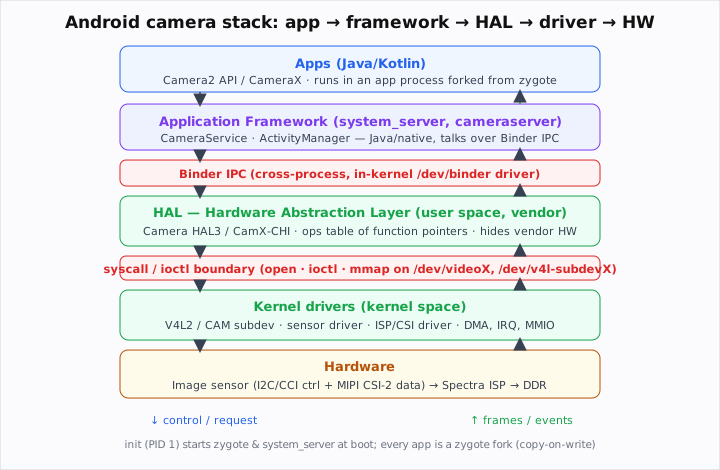
Example — a HAL is an ops table the framework calls blindly:
typedef struct {
    int (*open)(struct camera_device**);
    int (*configure_streams)(struct camera_device*, struct stream_config*);
    int (*process_capture_request)(struct camera_device*, struct capture_request*);
    int (*close)(struct camera_device*);
} camera_hal_ops;   // Android Camera HAL3 is exactly this shape
/* framework: dev->ops->process_capture_request(dev, req);  // no vendor detail here */
Why it exists. Portability and separation of concerns. Android runs on hundreds of different chips/sensors; the framework and apps must be written once against a fixed contract. The HAL is that contract: vendors (Qualcomm, sensor makers) implement it for their silicon, so the same Camera2 app works everywhere. It also lets the closed-source vendor blob live in user space (licensing/stability) above an open kernel driver.
Where you see it (Qualcomm). The Camera HAL3 / CamX-CHI is a flagship example — Qualcomm's user-space camera HAL that drives the Spectra ISP and sensors and presents the Android camera contract upward. The whole camera onsite round is described as "camera driver + Android HAL discussion."
Answer. "A HAL — Hardware Abstraction Layer — is the layer that gives the upper software a stable, hardware-agnostic interface while hiding chip- and vendor-specific details underneath. It's usually a table of function pointers the framework calls without knowing the concrete hardware. It exists for portability and separation of concerns: Android's framework and apps are written once against the HAL contract, and each vendor implements that contract for its SoC. Qualcomm's Camera HAL3/CamX is exactly this — it presents the Android camera interface and drives the Spectra ISP and sensors below."
Follow-ups / gotchas. The HAL runs in user space (a vendor .so), above the kernel driver — it talks to the driver via ioctl (B2), it is not itself in the kernel. Modern Android formalizes HALs as HIDL/AIDL interfaces served over Binder (often in a separate vendor process for stability/Treble). Don't confuse the HAL (abstraction interface) with the driver (kernel code touching hardware).
Seen in: CleverPrep camera guide ("camera driver + Android HAL discussion"), SW Engineer kernel/embedded ("How does the kernel communicate with the HAL?").
B2 · Q: How does the kernel communicate with the HAL?¶
Frequency: 🔥 Occasional (~2 reports) — asked explicitly in the kernel/embedded loop.
Concept — the basis. Careful with the direction: the HAL lives in user space, the driver lives in kernel space, so "kernel↔HAL communication" is really user↔kernel communication (A2) viewed from the camera stack. The HAL opens the driver's device node and drives it; the kernel pushes data and events back up:
- HAL → kernel: open() the /dev/videoX (or media/subdev) node, then ioctl to configure and command, and mmap/dma-buf to share buffers.
- kernel → HAL: the HAL queues empty buffers and dequeues filled ones (V4L2 VIDIOC_QBUF/DQBUF), using poll/select/eventfd to wait; the driver signals completion (often off the back of a frame-done ISR/bottom half).
Example — the V4L2 streaming loop the HAL runs:
ioctl(fd, VIDIOC_REQBUFS, &req);        // negotiate buffers
ioctl(fd, VIDIOC_QBUF, &buf);           // hand an empty buffer to the kernel
ioctl(fd, VIDIOC_STREAMON, &type);      // start
poll(&pfd, 1, -1);                      // wait until a frame is ready
ioctl(fd, VIDIOC_DQBUF, &buf);          // reclaim the filled buffer (zero-copy via mmap)
Why it matters. It ties three earlier ideas together: the user/kernel boundary (A1), the channels (A2), and the HAL concept (B1). Frame data must move with zero copy (mmap/dma-buf) because copying 12–108 MP frames per shot would burn power and bandwidth; control is small and synchronous, so ioctl fits.
Where you see it (Qualcomm). Camera HAL3/CamX configures the CSI/ISP/sensor subdevices via media-controller + V4L2 ioctls, shares frame buffers via dma-buf, and gets frame-done notifications that originate in a kernel ISR and propagate up through a poll/event mechanism.
Answer. "The HAL is in user space and the driver is in kernel space, so HAL↔kernel communication is the user↔kernel boundary: the HAL open()s the driver's device node and uses ioctl to configure and command it, shares frame buffers zero-copy via mmap/dma-buf, and waits on poll/eventfd for completion. The kernel side fills buffers — often triggered by a frame-done interrupt and its bottom half — and signals the HAL to dequeue them. For camera that's V4L2/media-controller ioctls plus dma-buf."
Follow-ups / gotchas. It's not a special private link — it's the standard syscall/ioctl/mmap machinery. With Treble, the HAL may run in its own process and reach apps via Binder, but it still reaches the kernel via ioctl. Buffer ownership and cache coherency are the subtle parts (who owns the buffer when, do you need a cache flush).
Seen in: SW Engineer kernel/embedded ("How does the kernel communicate with the HAL?"), CleverPrep camera guide.
B3 · Q: Explain the Android architecture (init, zygote, Binder, the layers).¶
Frequency: 🔥🔥 Common (~4 reports) — Android stack + zygote + Binder come up across camera/HAL and kernel rounds.
Concept — the basis. Android is a software stack on top of a (modified) Linux kernel:
1. Linux kernel — drivers, memory/process management, plus Android additions: the Binder IPC driver, ashmem/ION (shared memory), low-memory killer, wakelocks.
2. HAL — vendor user-space layer presenting hardware to the framework (B1).
3. Native libraries + Android Runtime (ART) — libc (Bionic), media, ART that runs app bytecode.
4. Application Framework — Java/Kotlin services: ActivityManager, WindowManager, CameraService, etc., running in system_server.
5. Apps — each in its own process and Linux UID for isolation.
Boot order: the kernel starts init (PID 1), which parses init.rc and launches native daemons and the zygote; zygote preloads ART + common classes and then forks every app process; system_server is zygote's first fork and hosts the framework services. Cross-process calls between apps and services go over Binder IPC (an in-kernel driver), not raw sockets/pipes.

Why it exists. Layering gives portability (apps don't know the chip — the HAL hides it), isolation (each app is its own process/UID, sandboxed by the kernel), and efficiency (zygote's preload-then-fork makes app launch fast and shares read-only pages via copy-on-write). Binder exists because Android needs fast, secure, reference-counted IPC with sender-identity (UID/PID) baked in — better suited than generic SysV IPC.
Where you see it (Qualcomm). The camera path threads the whole stack: Camera2 app → CameraService (framework, in system_server) → Camera HAL3/CamX (vendor, Binder/HIDL) → kernel ISP/sensor drivers → Spectra ISP hardware. Understanding it lets you place a bug at the right layer.
Answer. "Android sits on a modified Linux kernel — which adds the Binder IPC driver and shared-memory/power features — then the vendor HAL, the native libraries and ART runtime, the Java application framework, and apps on top. At boot, the kernel starts init as PID 1; init launches daemons and the zygote; zygote preloads the runtime and common classes and forks each app process (system_server, the framework host, is its first fork). Apps and framework services communicate over Binder IPC. Each app runs in its own process and UID for sandboxing. The camera stack runs straight down it: app → CameraService → Camera HAL → kernel driver → ISP."
Follow-ups / gotchas. Binder is the headline IPC, but Android also uses ashmem/dma-buf for bulk data and sockets internally. Treble split the vendor HAL into separate processes to decouple OS and vendor updates. Each app's own UID is what makes the sandbox; permissions gate cross-app/IPC access.
Seen in: CleverPrep camera guide ("Android camera architecture: Camera2 API, HAL3"), SW Engineer kernel/embedded (zygote, kernel↔HAL), Android-stack discussion across camera rounds.
B4 · Q: What is the function of zygote?¶
Frequency: 🔥 Occasional (~1–2 reports) — asked verbatim ("What is the function of zygote?").
Concept — the basis. Zygote is the template process every Android app is forked from. Started by init early in boot, zygote initializes the Android Runtime (ART) and preloads the common framework classes and shared resources/libraries into its address space once. When the system needs to launch an app, it sends a request over zygote's socket; zygote calls fork() to create the new app process, which inherits the already-warmed runtime and preloaded classes.
Mechanism — why fork-from-zygote is fast and cheap:
init ──spawns──▶ zygote (loads ART + ~thousands of classes/resources, ONCE)
                    │ fork() on request
                    ├──▶ system_server   (first fork: AMS, WMS, CameraService…)
                    ├──▶ com.app.camera   (inherits preloaded classes via copy-on-write)
                    └──▶ com.app.browser
Why it exists. Starting a fresh ART and re-loading thousands of framework classes for every app launch would be slow and waste RAM. Preloading once in zygote and forking amortizes that cost and shares the immutable pages across all apps — a classic space/time win exploiting fork's copy-on-write.
Where you see it (Qualcomm). It's a favorite "do you know Android internals?" probe in kernel/embedded loops. The practical relevance: a camera app, like every app, is a zygote fork; its launch latency and memory footprint are shaped by zygote preloading.
Answer. "Zygote is the process all Android apps are forked from. init starts it at boot; it initializes the ART runtime and preloads the common framework classes and resources once. To launch an app, the system tells zygote to fork(), and the child inherits the warmed-up runtime and preloaded classes — shared copy-on-write, so launch is fast and memory-efficient. system_server, the framework host, is zygote's first fork."
Follow-ups / gotchas. Modern Android has a 64-bit and 32-bit zygote, and USAP (unspecialized app processes) to pre-fork further. The shared preloaded pages are read-only/COW; once an app writes, it gets a private copy. Don't confuse zygote (app template) with init (PID 1 that starts zygote).
Seen in: SW Engineer kernel/embedded ("What is the function of zygote?").
C. Device drivers¶
C1 · Q: What are the types of device drivers? (Character vs block vs network.)¶
Frequency: 🔥🔥 Common (~4 reports) — "kernel drivers," "device driver role," "Linux module development" all assume this taxonomy.
Concept — the basis. Linux groups drivers into three classes by how user space accesses the device:

| Class | Access model | I/O granularity | Node | Examples |
|---|---|---|---|---|
| Character | sequential byte stream via a /dev node |
one byte at a time, no buffering by the kernel block layer | /dev/ttyS0, /dev/cam0 |
serial, sensors, most camera/V4L2 subdevs, keyboards |
| Block | random-access fixed-size blocks, goes through the kernel buffer cache + I/O scheduler | blocks (e.g. 512 B/4 KB) | /dev/sda, /dev/mmcblk0 |
eMMC/UFS, SD cards, disks |
| Network | packets via the socket/net_device API — no /dev node |
packets (frames) | eth0, wlan0, rmnet0 |
Ethernet, WiFi, modem data |
Example — a character driver registers a file_operations and a device number:
static const struct file_operations fops = {
    .owner = THIS_MODULE, .open = cam_open, .read = cam_read,
    .write = cam_write, .unlocked_ioctl = cam_ioctl, .release = cam_close,
};
/* register a region of (major,minor) numbers + a cdev bound to fops */
Why it exists. The three classes match three fundamentally different device behaviors. A UART is inherently a stream (character). A disk is randomly addressable blocks you want cached and scheduled for throughput (block). A NIC moves packets asynchronously and plugs into the network stack, not a file (network). One uniform model would serve none well, so the kernel offers three with tailored infrastructure.
Where you see it (Qualcomm). Camera/V4L2 subdevices and most sensor/ISP control nodes are character devices (/dev/videoX, /dev/v4l-subdevX); UFS/eMMC storage are block; the modem's data path and WiFi are network drivers. Knowing the class tells you which entry-point API and buffering you'll write.
Answer. "Linux has three driver classes. Character drivers present a sequential byte stream through a /dev node — serial ports, sensors, most camera/V4L2 devices; they implement a file_operations table. Block drivers handle random-access fixed-size blocks through the kernel's buffer cache and I/O scheduler — eMMC/UFS, SD, disks. Network drivers move packets through the socket/net_device API and have no /dev node — Ethernet, WiFi, the modem. The class is chosen by how the device naturally behaves: stream, block storage, or packets."
Follow-ups / gotchas. Not every device is a /dev file — network devices deliberately aren't. Some hardware is exposed via higher subsystems (V4L2, IIO, input) layered on top of the character model. A "misc" device is a simple shared-major character device. Modern camera uses the media controller framework over multiple character subdev nodes.
Seen in: SW Engineer kernel/embedded ("kernel drivers"), Reddit device-driver role (B11), Engineer experienced ("Linux Module development"); standard driver taxonomy.
C2 · Q: What is the file_operations table?¶
Frequency: 🔥🔥 Common (~4 reports) — the core of every character-driver / "Linux module development" answer; cross-ref 01_c_programming.md A4 (function pointers).
Concept — the basis. struct file_operations is a table of function pointers that connects the generic VFS syscalls (open/read/write/ioctl/mmap/close) to your driver's implementations. When user space does read(fd, …) on your device, the VFS looks up the struct file's f_op and calls f_op->read(…). This is the kernel's polymorphism mechanism (no classes — just function pointers), exactly like a HAL ops table (B1).
Example — a minimal character driver's ops table and entry points:
#include <linux/fs.h>
static int     cam_open (struct inode *i, struct file *f){ return 0; }
static int     cam_close(struct inode *i, struct file *f){ return 0; }
static ssize_t cam_read (struct file *f, char __user *u, size_t n, loff_t *o){
    char k[64]; size_t len = min(n, sizeof k);
    return copy_to_user(u, k, len) ? -EFAULT : len;     // A3
}
static long    cam_ioctl(struct file *f, unsigned int cmd, unsigned long arg){
    /* dispatch on cmd; copy_from_user the arg */ return 0;          // A4
}
static const struct file_operations cam_fops = {
    .owner          = THIS_MODULE,
    .open           = cam_open,
    .read           = cam_read,
    .unlocked_ioctl = cam_ioctl,
    .release        = cam_close,
};
Why it exists. It decouples the uniform syscall interface from the device-specific code. The VFS doesn't know or care what your device is; it just calls through the pointers you registered. Unimplemented ops are left NULL (the kernel either skips them or returns a sensible default). It's the same late-binding idea as the camera HAL and as qsort's comparator.
Where you see it (Qualcomm). Every char-style driver you write (sensor, ISP control node, a test/debug module) fills in a file_operations. V4L2's v4l2_ioctl_ops / v4l2_subdev_ops and DRM's ops tables are the camera/display-specific descendants of the same pattern.
Answer. "file_operations is a struct of function pointers that maps the VFS syscalls — open, read, write, unlocked_ioctl, mmap, release — to your driver's functions. When user space calls read() on your device node, the kernel dispatches through this table to your read handler. It's how the kernel does polymorphism without classes, and it's the heart of a character driver. You set .owner = THIS_MODULE and fill in only the ops you support; the rest stay NULL."
Follow-ups / gotchas. It's .unlocked_ioctl now (the old .ioctl is gone). .owner = THIS_MODULE lets the kernel refcount your module so it can't be unloaded while a file is open. Inside read/write you must use copy_*_user (A3) — never deref the user pointer. The struct file carries private_data (your per-open context cookie — the void* of 01 A3).
Seen in: SW Engineer kernel/embedded ("kernel drivers"), Engineer experienced ("Linux Module development"); cross-ref 01_c_programming.md A4.
C3 · Q: How do you write and compile a Linux kernel module? (insmod/rmmod/modprobe, the Makefile.)¶
Frequency: 🔥🔥 Common (~4 reports) — "Linux Module development" is a named round topic; "how to compile linux kernel" pairs with it.
Concept — the basis. A loadable kernel module (LKM) is kernel code (.ko) you can insert into and remove from a running kernel without rebooting. The minimum: an init function (runs on load), an exit function (runs on unload), a license macro, and a kbuild Makefile that builds against the kernel headers.
Example — the canonical "hello driver" + its Makefile:
/* hello.c */
#include <linux/module.h>
#include <linux/kernel.h>
#include <linux/init.h>

static int __init hello_init(void){
    pr_info("hello: loaded\n");      // appears in dmesg
    return 0;                        // nonzero return => load fails
}
static void __exit hello_exit(void){
    pr_info("hello: unloaded\n");
}
module_init(hello_init);
module_exit(hello_exit);
MODULE_LICENSE("GPL");               // required, or the kernel taints/limits you
MODULE_AUTHOR("you");
MODULE_DESCRIPTION("minimal LKM");
# Makefile — 'obj-m' tells kbuild to build hello.ko as a module
obj-m += hello.o
KDIR ?= /lib/modules/$(shell uname -r)/build
all:
    $(MAKE) -C $(KDIR) M=$(PWD) modules        # build against the kernel's build tree
clean:
    $(MAKE) -C $(KDIR) M=$(PWD) clean
make                       # produces hello.ko
sudo insmod  hello.ko      # load it (calls hello_init); dmesg shows "loaded"
lsmod | grep hello         # see it loaded
sudo rmmod   hello         # unload (calls hello_exit)
sudo modprobe hello        # load by name AND auto-resolve dependencies (uses /lib/modules)
Why it exists. Modules keep the kernel modular and small: you load only the drivers a given board needs, develop/iterate a driver without rebuilding+rebooting the whole kernel, and let distros ship one kernel with thousands of optional .kos. insmod loads a single file; modprobe is smarter — it pulls in dependencies and finds the module by name under /lib/modules.
Where you see it (Qualcomm). Bringing up a new sensor/ISP/peripheral driver as a module, iterating on it (rmmod/insmod in a tight loop), and shipping it built-in (obj-y) or as a module (obj-m). dmesg + pr_info/dev_dbg is your primary feedback (H2).
Answer. "A kernel module is .ko code you load into a running kernel. The minimum is an __init function registered with module_init (runs on load), an __exit with module_exit (runs on unload), and MODULE_LICENSE. You build it with a kbuild Makefile that sets obj-m += foo.o and invokes make -C /lib/modules/$(uname -r)/build M=$PWD modules. Then insmod foo.ko loads it, rmmod foo unloads it, and modprobe foo loads it by name while resolving dependencies. pr_info/printk output shows in dmesg."
Follow-ups / gotchas. insmod vs modprobe: insmod takes a path and doesn't resolve deps; modprobe resolves deps and searches /lib/modules. The module must be built against matching kernel headers/version (vermagic), or it won't load. MODULE_LICENSE("GPL") matters — non-GPL taints the kernel and hides GPL-only symbols. A real driver's init registers a file_operations/driver, and exit unregisters it (mirror cleanup; use the goto-cleanup idiom from 01 C3).
Seen in: Engineer experienced ("Linux Module development", "how to compile linux kernel"), Engineer 46 ("Linux Module development"); standard embedded-Linux expectation.
C4 · Q: How do you configure and compile the Linux kernel? (menuconfig / make.)¶
Frequency: 🔥🔥 Common (~3–4 reports) — "Why linux kernel? And about how to compile linux kernel?" asked twice; "Prep Embedded Linux."
Concept — the basis. Building the kernel is: get the source → configure (pick features/drivers) → compile → install. Configuration produces a .config (thousands of CONFIG_* options, each y = built-in, m = module, n = off). You edit it via interactive tools or a board defconfig.
Example — the standard flow (native and cross):
# 1) configure
make menuconfig            # ncurses menu to toggle CONFIG_* (also: nconfig, xconfig)
#   or start from a board default:
make defconfig             # generic default for the host arch
make ARCH=arm64 defconfig  # arch default; or:  make ARCH=arm64 <board>_defconfig

# 2) compile (parallel)
make -j$(nproc)            # builds vmlinuz/Image + the modules you marked 'm'
make -j$(nproc) modules

# 3) install
sudo make modules_install  # copies .ko into /lib/modules/<ver>
sudo make install          # installs the kernel image + initramfs (on a host)

# cross-compile for ARM64 (Qualcomm-style):
make ARCH=arm64 CROSS_COMPILE=aarch64-linux-gnu- Image dtbs modules -j$(nproc)
Why it exists. The kernel must run on everything from a watch to a server, so it's massively configurable: you compile in only the subsystems/drivers a target needs (smaller image, less attack surface, faster boot). menuconfig makes the huge option space navigable; defconfigs capture a known-good baseline per board so you don't start from scratch. Marking a driver m (module) vs y (built-in) decides whether it ships as a loadable .ko (C3) or is baked in.
Where you see it (Qualcomm). Building a Snapdragon/board kernel from a vendor defconfig, toggling camera/ISP/sensor CONFIG_* options, and cross-compiling for arm64 with an aarch64 toolchain (F3). You also build the device tree (dtbs) describing the board's hardware to the kernel.
Answer. "You fetch the source, configure it, then compile and install. Configuration lives in .config, where each CONFIG_* option is built-in (y), a module (m), or off (n). You edit it with make menuconfig, or start from a board defconfig. Then make -j$(nproc) builds the image and modules, make modules_install and make install deploy them. For Qualcomm you cross-compile: make ARCH=arm64 CROSS_COMPILE=aarch64-linux-gnu- Image dtbs modules. You also build the device tree blobs that describe the board's hardware."
Follow-ups / gotchas. "Why the Linux kernel?" → open, portable, huge driver ecosystem, mature scheduler/MM/networking, vendor support — you rarely write an OS from scratch. y vs m: built-in is always present (needed for boot-critical drivers like the root storage); module is loaded on demand. The device tree (vs old board files) decouples hardware description from kernel code. make -j parallelizes; the build is large.
Seen in: Engineer experienced ("how to compile linux kernel", "Why linux kernel?"), Engineer 46 (same), Embedded SW App ("software development process"); "Prep Embedded Linux" tip.
D. Interrupts & ISRs¶
D1 · Q: What is an interrupt / ISR, and why must an ISR be short?¶
Frequency: 🔥🔥 Common (~3–4 reports) — "What is isr" asked directly; "Software Interrupts? different types of interrupts?"; assumed in driver rounds.
Concept — the basis. An interrupt is a hardware signal that tells the CPU "stop what you're doing and handle me now." The CPU saves minimal state, looks up the interrupt vector table to find the handler, and runs the ISR (Interrupt Service Routine) — a function that services the device (read the cause, clear the flag, grab the data) and returns so normal execution resumes. Interrupts replace polling (spinning in a loop asking "are you ready yet?"), which wastes CPU and power.

Example — register a handler and keep it tiny:
static irqreturn_t cam_isr(int irq, void *dev_id){
    u32 status = readl(base + INT_STATUS);   // read why we were interrupted (MMIO)
    writel(status, base + INT_CLEAR);        // ACK/clear so it doesn't re-fire
    schedule_work(&cam_work);                // defer the heavy lifting (D2)
    return IRQ_HANDLED;
}
request_irq(irq, cam_isr, IRQF_SHARED, "cam", dev);  // wire it up at probe time
Why an ISR must be short. While an ISR runs it executes in interrupt context — typically with that interrupt (or all interrupts) masked, no process to block on, and no permission to sleep. A long ISR:
- raises interrupt latency for everything else (other devices' IRQs are delayed/lost → dropped frames, missed deadlines);
- cannot sleep — so it must not call blocking APIs, mutex_lock, kmalloc(GFP_KERNEL), copy_to_user, or anything that might schedule;
- risks overruns if the next interrupt arrives before it finishes.
So the rule: do the minimum in the ISR (top half), defer the rest (bottom half).
Why interrupts exist. Efficiency and responsiveness. Without them you'd poll every device continuously, burning CPU and battery and adding latency. Interrupts let the CPU do useful work (or sleep to save power) until a device actually needs attention — essential on a phone.
Where you see it (Qualcomm). A camera "frame-done" or "SOF (start-of-frame)" interrupt fires per frame; the ISR must just acknowledge and hand off, because at 30–240 fps you cannot afford slow handlers. DMA-complete, sensor error, and timer interrupts work the same way.
Answer. "An interrupt is a hardware signal that makes the CPU suspend its current work and jump, via the vector table, to an interrupt service routine that services the device and returns. It replaces wasteful polling. An ISR must be short because it runs in interrupt context with interrupts masked and cannot sleep — a long handler raises latency for every other device, can drop interrupts, and mustn't call blocking or sleeping APIs like mutexes, kmalloc(GFP_KERNEL), or copy_to_user. So you do the bare minimum — acknowledge the hardware, grab the data — and defer the heavy work to a bottom half."
Follow-ups / gotchas. Interrupt context ≠ process context: no current you can block on, no sleeping. Shared data with an ISR must be protected with spin_lock_irqsave (not a mutex) and marked volatile/atomic (01 B3). Level- vs edge-triggered; you must clear the source or it re-fires. Software interrupts/exceptions (syscalls, faults) are the synchronous cousins (D3).
Seen in: System Engineer ("What is isr"), SDE off-campus 2023 ("Software Interrupts? Explain different types of interrupts?"), driver rounds; standard embedded expectation.
D2 · Q: Explain top half vs bottom half. What are tasklets and workqueues, and when do you use each?¶
Frequency: 🔥🔥 Common (~3 reports) — the deep follow-up to "what is an ISR" and a staple of driver loops.
Concept — the basis. To keep ISRs short (D1), interrupt handling is split: - Top half = the ISR itself: runs immediately in interrupt context, does the urgent minimum (ack hardware, read/queue data), then schedules deferred work and returns. - Bottom half = the deferred work, run later with interrupts enabled, when it's safe to take more time. Linux offers three bottom-half mechanisms:
| Mechanism | Context | Can sleep? | Notes / use |
|---|---|---|---|
| softirq | interrupt (atomic) | No | highest-frequency, statically defined; used by net & block (perf-critical) |
| tasklet | interrupt (atomic) | No | built on softirqs; serialized (a given tasklet runs on one CPU at a time); easy "do this soon, can't sleep" |
| workqueue | process (kworker thread) | Yes | runs in a kernel thread → may block, sleep, take mutexes, allocate GFP_KERNEL, do I2C transfers |
The decision rule: if the deferred work might sleep/block → workqueue; otherwise → tasklet (or softirq for the hottest paths). A modern alternative is a threaded IRQ (request_threaded_irq), where the bottom half is a dedicated kernel thread that can sleep.
Example — schedule a workqueue from the ISR because the work needs to sleep (I2C):
static struct work_struct cam_work;
static void cam_work_fn(struct work_struct *w){
    /* process context: safe to sleep, lock mutexes, do an I2C register read, alloc */
    handle_frame_metadata();
}
static irqreturn_t cam_isr(int irq, void *id){
    ack_hw();
    schedule_work(&cam_work);     // top half hands off to the bottom half
    return IRQ_HANDLED;
}
/* init: INIT_WORK(&cam_work, cam_work_fn); */

/* tasklet flavor (cannot sleep), for quick, non-blocking deferral: */
static void tl_fn(unsigned long d){ /* atomic context: NO sleeping */ }
DECLARE_TASKLET(my_tl, tl_fn, 0);
/* in ISR: tasklet_schedule(&my_tl); */
Why it exists. It's the resolution of a tension: interrupts must be serviced fast (low latency), but the response to an interrupt often needs time or blocking operations (talk to the sensor over I2C, allocate memory, copy to user). Splitting into a quick top half + a deferrable bottom half gives both. Choosing tasklet vs workqueue is exactly the "can this work sleep?" question.
Where you see it (Qualcomm). A frame-done ISR (top half) just acknowledges and schedules a workqueue (or threaded IRQ) to do the slower per-frame bookkeeping, sensor I2C reads (which block), or buffer hand-off to user space — none of which can run in the ISR. Networking/modem fast paths lean on softirqs/tasklets for speed.
Answer. "Interrupt handling is split into a top half and a bottom half. The top half is the ISR — it runs in interrupt context, does the urgent minimum (ack the hardware, grab data), and can't sleep. The bottom half is deferred work run later with interrupts enabled. Tasklets and softirqs run the bottom half in atomic context and cannot sleep — good for fast, non-blocking work (networking uses softirqs). Workqueues run it in a kernel thread in process context, so they can sleep — use them when the work needs to block, take a mutex, allocate, or do an I2C transfer. Rule: if it can sleep, workqueue; otherwise tasklet. Threaded IRQs are the modern sleepable bottom half."
Follow-ups / gotchas. Tasklets and softirqs cannot sleep (atomic context) — calling a blocking API there is a bug (and can deadlock/oops). A tasklet of the same type won't run concurrently with itself (serialized); softirqs can run on multiple CPUs. Tasklets are being deprecated in favor of threaded IRQs/workqueues in newer kernels. Shared data between top and bottom half still needs locking.
Seen in: Driver/embedded loops; the depth follow-up to "what is an ISR" (System Engineer); standard kernel-driver expectation.
D3 · Q: What are software interrupts, and what are the different types of interrupts?¶
Frequency: 🔥 Occasional (~2 reports) — "What are Software Interrupts? Explain different types of interrupts?"
Concept — the basis. "Interrupt" broadly covers any event that diverts the CPU to a handler. The taxonomy:
| Type | Source | Synchronous? | Examples |
|---|---|---|---|
| Hardware (external) interrupt | a device asserts an IRQ line | async (any time) | timer tick, key press, frame-done, DMA-complete |
| Software interrupt / trap | an instruction the program executes | sync (deterministic) | a system call (svc/syscall/int 0x80), INT n |
| Exception / fault | the CPU detects an error mid-instruction | sync | page fault, divide-by-zero, invalid opcode, segmentation fault |
A software interrupt is one deliberately triggered by software — most importantly the system call mechanism: user code executes a trap instruction to enter the kernel (A5). (Confusingly, Linux also has "softirqs" (D2), which are a bottom-half mechanism, not this CPU concept — different thing, similar name.)
Example:
read(fd, buf, n);     // the C wrapper executes 'svc #0' (ARM) — a SOFTWARE interrupt
                      // into the kernel: synchronous, deterministic, on purpose.
int x = a / 0;        // EXCEPTION (fault): the CPU traps automatically
/* a sensor asserting its IRQ line → HARDWARE interrupt: asynchronous */
Why it matters. It frames how user code reaches the kernel (software interrupt = syscall, A5), how errors are caught (exceptions/faults → core dumps, 01 D3), and how devices get serviced (hardware interrupts → ISRs, D1). The sync/async distinction is the key: software interrupts and exceptions happen because of the current instruction; hardware interrupts happen independently of it.
Where you see it (Qualcomm). The user/kernel crossing (A1, A5) is a software interrupt. Faults (page fault, alignment SIGBUS) show up in bring-up crashes; hardware interrupts drive every peripheral. cat /proc/interrupts shows hardware-IRQ counts per CPU.
Answer. "Interrupts split into three kinds. Hardware (external) interrupts come from devices asynchronously — timers, key presses, frame-done, DMA-complete — and run an ISR. Software interrupts are triggered deliberately by an instruction and are synchronous — the system-call trap (svc/syscall) that takes user code into the kernel is the main one. Exceptions or faults are synchronous events the CPU raises on errors — page faults, divide-by-zero, invalid opcodes. Software interrupts and exceptions are tied to the current instruction; hardware interrupts are independent of it. Note Linux 'softirqs' are a separate bottom-half concept, not this."
Follow-ups / gotchas. Maskable vs non-maskable (NMI — e.g. a watchdog/critical fault you can't ignore). Vectored vs polled interrupt controllers (ARM GIC). On a syscall the CPU does a mode switch, not necessarily a context switch. "What happens when you press a key?" (a real report question) is the end-to-end hardware-interrupt story.
Seen in: SDE off-campus 2023 ("Software Interrupts? different types of interrupts?"), Campus SWE ("What happens when we press a keyboard key?"); standard expectation.
E. RTOS, real-time & watchdogs¶
E1 · Q: What is an RTOS and how does it differ from a general-purpose OS like Linux?¶
Frequency: 🔥🔥 Common (~3–4 reports) — "What is RTOS and how does it differ from OS?", "real-time OS based questions", "RTOS" listed as a skill.
Concept — the basis. A real-time operating system (RTOS) is an OS designed so that tasks meet deadlines deterministically — the headline property is bounded, predictable latency, not raw throughput. A general-purpose OS (Linux, stock) optimizes average performance and fairness; an RTOS optimizes worst-case timing.
| RTOS (e.g. FreeRTOS, QNX, VxWorks, ThreadX) | General-purpose OS (stock Linux) | |
|---|---|---|
| Goal | meet deadlines; deterministic worst-case latency | throughput, fairness, average performance |
| Scheduler | usually fixed-priority preemptive (highest-priority ready task always runs) | CFS/EEVDF — fair, time-sliced, dynamic priorities |
| Latency | small and bounded (µs) | low average but not guaranteed bounded |
| Footprint | tiny (KB), often no MMU | large (MB), full MMU/VM |
| Real-time kinds | hard (miss = failure) / soft | soft at best (unless PREEMPT_RT) |
Real-time ≠ fast. It means predictable: a hard-real-time task that must run within 1 ms must always do so, even under load.
Why it exists. Some jobs fail catastrophically if late: a motor controller, an airbag, a modem's timing-critical frame, a camera's sensor-sync deadline. A fair, throughput-oriented scheduler can occasionally delay a task arbitrarily — unacceptable. An RTOS trades features and average performance for guarantees.
Where you see it (Qualcomm). SoCs are heterogeneous: the application CPUs run Linux/Android, but DSPs (Hexagon), sensor MCUs, and the modem run an RTOS for hard-real-time signal processing and protocol timing. Camera sensor sync, AEC/AGC loops, and modem L1 have tight deadlines that suit an RTOS.
Answer. "An RTOS is built to meet deadlines deterministically — its defining trait is bounded, predictable worst-case latency, not throughput. It typically uses fixed-priority preemptive scheduling so the highest-priority ready task always runs, has a tiny footprint, and supports hard real-time where a missed deadline is a failure. A general-purpose OS like Linux optimizes average performance and fairness with a time-sliced fair scheduler, giving low average latency but no hard guarantee. Real-time means predictable, not necessarily fast. On a Snapdragon, the apps CPU runs Linux while the DSP, sensor MCU, and modem run an RTOS for hard-real-time work."
Follow-ups / gotchas. Hard vs soft vs firm real-time. Stock Linux isn't hard-real-time, but PREEMPT_RT makes it much more preemptible/bounded (now largely mainline). RTOS gotchas: priority inversion (E3) is a classic, and an RTOS usually offers priority inheritance mutexes to fix it. "Why not just use Linux everywhere?" → deadline guarantees, footprint, power on tiny cores. Cross-link scheduling theory → 04_os.md.
Seen in: Engineer ("What is RTOS and how does it differ from OS?", "Why not to use malloc?"), Engineer 2017 ("real-time OS based questions"), Embedded SW App; "RTOS" listed as an evaluated skill.
E2 · Q: How does RTOS/real-time scheduling differ from Linux scheduling? (Is time-slicing good for real-time?)¶
Frequency: 🔥🔥 Common (~3 reports) — "Time-slicing scheduling; is time slicing a good choice for a game developer's scheduling algorithm?", "weighted round robin", "OS schedulers."
Concept — the basis. This is E1 zoomed into the scheduler. Two philosophies: - Time-sliced / round-robin (fairness): each ready task gets a quantum (e.g. a few ms) in turn; good for fairness and throughput among equal tasks, but a high-priority task may wait up to (N−1)·quantum before running — not deterministic. - Fixed-priority preemptive (real-time): the highest-priority ready task always runs immediately, preempting lower ones. Deterministic for the top task, but lower-priority tasks can starve.
Real-time scheduling theory (mention if pushed): Rate-Monotonic (RMS) assigns priority by frequency (shorter period → higher priority), optimal among fixed-priority schemes; Earliest-Deadline-First (EDF) is dynamic and can hit 100% utilization. Linux exposes SCHED_FIFO/SCHED_RR (real-time, fixed-priority) alongside the default fair scheduler (SCHED_OTHER).
Example — "is time-slicing good for a game's scheduling?":
A game has a hard ~16.6 ms frame budget (60 fps). Pure round-robin time-slicing
makes the render task wait its turn behind unrelated tasks → unpredictable frame
times / jank. Better: give the render/update loop high, fixed priority (or a
real-time class) so it runs deterministically each frame. So: time-slicing alone
is a POOR fit for hard timing; priority-based preemption is the right tool.
Why the distinction matters. "Fair" and "real-time" are different objectives. Time-slicing maximizes responsiveness among equals and prevents any one task from hogging the CPU — great for a desktop. But anything with a deadline (a game frame, a control loop, a modem slot) needs priority, not fairness, or it misses the deadline under load.
Where you see it (Qualcomm). Camera 3A loops, sensor sync, and modem L1 want priority-based determinism (RTOS or SCHED_FIFO), while Android's app workloads run under the fair scheduler. Mis-assigning priorities causes jank or dropped frames.
Answer. "Time-sliced/round-robin scheduling gives each task a turn for fairness and throughput, but a high-priority task can wait many quanta — non-deterministic. Real-time/RTOS scheduling is fixed-priority preemptive: the highest-priority ready task always runs immediately, which is deterministic but can starve lower tasks. So for anything with a hard deadline — a game's frame budget, a control loop, a modem slot — pure time-slicing is a poor choice; you want priority-based preemption (or a real-time class like SCHED_FIFO), possibly with Rate-Monotonic or EDF assignment. Linux provides both: the fair scheduler by default and SCHED_FIFO/SCHED_RR for real-time tasks."
Follow-ups / gotchas. Fixed-priority risks starvation (mitigate with aging or careful design) and priority inversion (E3). RMS vs EDF tradeoffs. Weighted round robin (a report keyword) gives unequal shares — still fairness-flavored, not hard-real-time. Full scheduling-algorithm detail (RR, SJF, MLFQ, CFS) → 04_os.md.
Seen in: SW Engineer kernel/embedded ("is time slicing a good choice for a game developer's scheduling?"), Embedded SW App ("prioritized processes, weighted round robin"), multiple "OS schedulers" mentions; cross-link 04_os.md.
E3 · Q: What is priority inversion and how do you solve it?¶
Frequency: 🔥🔥 Common (~4 reports) — "Priority Inversion, ex," "priority inversion and its solutions," "priority inheritance solution," listed repeatedly.
Concept — the basis. Priority inversion is when a high-priority task is blocked waiting for a resource (mutex) held by a low-priority task — and a medium-priority task (needing neither) preempts the low task, so the low task can't finish and release the lock. The net effect: the medium task effectively runs ahead of the high one — priorities are "inverted." The high task can be blocked for an unbounded time.

Example timeline:
L acquires mutex M.
H becomes ready, preempts L, tries to lock M → BLOCKS (L holds it).
M (medium, unrelated) becomes ready, preempts L (L is now lowest runnable).
  → M runs; L can't run; L can't release M; H stays blocked. Inversion!
Eventually M finishes → L runs → L releases M → H finally proceeds.
Solutions: - Priority inheritance (PIP): while H is blocked on M, the OS temporarily boosts L to H's priority, so medium tasks can't preempt L; L finishes its critical section fast and releases M, then drops back. (Per-resource, dynamic.) - Priority ceiling (PCP): each mutex has a ceiling = the highest priority of any task that uses it; a task locking the mutex immediately runs at that ceiling, preventing the inversion (and certain deadlocks). (Defined up front.) - Disable interrupts/preemption during very short critical sections (blunt; only for tiny sections).
Why it matters — the famous case. The Mars Pathfinder (1997) kept resetting on Mars: a high-priority bus-management task was blocked by a low-priority weather task while medium tasks ran; a watchdog detected the missed deadline and reset the system. The fix, uploaded from Earth, enabled priority inheritance on the VxWorks mutex. It's the canonical interview story.
Where you see it (Qualcomm). Any RTOS/real-time path sharing a mutex between tasks of different priority — sensor/ISP control, modem, audio. A high-priority deadline missed because a low task held a lock too long (with a medium task in between) is exactly this bug.
Answer. "Priority inversion is when a high-priority task is blocked on a lock held by a low-priority task, and a medium-priority task preempts the low one — so the low task can't release the lock and the high task is stuck behind the medium task, inverting their effective priorities, potentially unbounded. The standard fix is priority inheritance: while the high task waits, the OS boosts the lock-holder to the high task's priority so it can finish and release quickly. The alternative is the priority ceiling protocol, where locking a mutex immediately raises you to that mutex's ceiling priority. The Mars Pathfinder resets were this bug, fixed by enabling priority inheritance in VxWorks."
Follow-ups / gotchas. PIP is per-resource and reactive; PCP is proactive and also prevents deadlock, but needs knowing all users up front. POSIX/pthreads exposes this via pthread_mutexattr_setprotocol(..., PTHREAD_PRIO_INHERIT/PTHREAD_PRIO_PROTECT). Distinguish from deadlock (mutual circular wait) and from starvation. Cross-link general mutex/semaphore/deadlock → 04_os.md.
Seen in: Embedded SW App ("Priority inversion in a RTOS and its solutions"), Embedded/Systems ("Priority Inversion, ex"), off-campus 2021 ("Priority Inversion"), University grad ("priority inversion problem and the priority inheritance solution").
E4 · Q: Difference between a software watchdog and a hardware watchdog timer.¶
Frequency: 🔥🔥 Common (~3 reports) — "Software watchdog timers" asked in multiple embedded loops.
Concept — the basis. A watchdog timer is a safety mechanism that resets (or recovers) the system if software stops behaving. It's a countdown timer that the software must periodically "kick"/"feed"/"pet" (reset the counter) to prove it's alive. If the software hangs and fails to kick in time, the watchdog fires — typically resetting the device.
| Hardware watchdog | Software watchdog | |
|---|---|---|
| Implemented in | a dedicated HW timer/IC, independent of the main CPU | a kernel/RTOS timer + monitor task, in software |
| Catches | total hangs, even a fully wedged CPU / crashed kernel | hung application/task (monitor must still run) |
| Reliability | high — fires even if all software is dead | lower — useless if the whole system (incl. the monitor) is frozen |
| Action | hard reset of the SoC | kill/restart the offending task, log, or trigger HW WD |
| Cost/flexibility | needs HW; coarse (usually full reset) | cheap, flexible (granular recovery) |
Example — kick the hardware watchdog from the main loop:
wd_set_timeout(2000);          // reset me if I don't kick within 2 s
for (;;) {
    do_work();
    if (healthy()) wd_kick();  // "I'm alive" — reload the counter
    // if do_work() ever hangs, the kick stops → HW watchdog resets the SoC
}
Why it exists. Embedded devices run unattended — there's no human to power-cycle a frozen phone/sensor. A watchdog provides automatic recovery from software hangs, deadlocks, or runaway tasks. The hardware one is the last line of defense precisely because it's independent of the software it watches — it works even when the CPU/kernel is completely wedged.
Where you see it (Qualcomm). SoCs have hardware watchdogs that reset the chip (or a subsystem like the modem/DSP) if the firmware stops kicking; a software watchdog (e.g. Android's watchdog in system_server, or a kernel softdog) catches a hung service and can restart it or escalate to the hardware watchdog. The Mars Pathfinder reset (E3) was a watchdog firing on a missed deadline.
Answer. "A watchdog timer resets or recovers the system if software stops kicking it within a timeout. A hardware watchdog is a dedicated timer independent of the main CPU — it fires even if the kernel is completely hung, and typically forces a hard reset; it's the reliable last resort. A software watchdog is a timer plus a monitor task in software — cheaper and more flexible (it can kill and restart just the offending task and log diagnostics), but it's useless if the whole system, including the monitor, freezes. Often you layer them: the software watchdog handles task-level hangs, and the hardware watchdog backstops a total lockup. They matter because embedded devices run unattended with no one to power-cycle them."
Follow-ups / gotchas. A windowed watchdog requires the kick within a min and max window (catches a task that's looping too fast or too slow). Don't kick from an ISR/timer blindly — kick only when you've verified real progress, or you defeat the purpose. The watchdog often saves a crash reason/register dump before reset for post-mortem. /dev/watchdog is the Linux interface; writing to it kicks it.
Seen in: Embedded SW App ("Software watchdog timers"), Embedded/Systems ("Software watchdog"), telephonic embedded round ("software watchdog timers"); standard embedded expectation.
F. Boot, memory & toolchains¶
F1 · Q: Describe the boot sequence / what a bootloader does.¶
Frequency: 🔥🔥 Common (~3 reports) — "kernel bootloader issue debugging," "how to compile linux kernel" (boot context), Android-stack rounds.
Concept — the basis. Booting is the staged handoff from the first instruction at power-on to a running OS. Each stage initializes a bit more hardware, then loads and jumps to the next (verifying its signature in a secure-boot chain). A bootloader is the firmware that sits between low-level init and the OS kernel: it sets up RAM/clocks, finds the kernel image, loads it into memory, passes boot arguments + a device tree, and jumps to it.
Generic vs Snapdragon vs PC:
Embedded/Android (Snapdragon):
  Boot ROM (PBL, on-die, immutable)
    → Secondary bootloader (XBL/SBL: bring up DDR, clocks, TrustZone)
      → Application bootloader (ABL/aboot, or U-Boot on some platforms: fastboot, load kernel+dtb)
        → Linux kernel (decompress, init drivers, mount rootfs)
          → init (PID 1) → zygote/system_server → apps      (B3/B4)

PC analogue:  BIOS/UEFI → GRUB → vmlinuz → init/systemd → daemons
Why it exists / staged? At power-on almost nothing is initialized — no DRAM, no clocks set, just a tiny ROM. You can't load a big kernel into RAM that isn't trained yet. So a minimal immutable ROM brings up just enough to load a slightly bigger bootloader, which brings up DRAM and more, which loads the kernel. Staging also enables a chain of trust: each stage verifies the next's signature before running it (secure boot), so only authorized software runs.
Where you see it (Qualcomm). Snapdragon's PBL→XBL→ABL chain (with TrustZone) is exactly this; "kernel bootloader issue debugging" was a real candidate task. The bootloader passes the device tree describing the board to the kernel; a wrong DT or a bad image shows up as a boot hang you debug from early logs.
Answer. "Booting is a staged handoff. At power-on a tiny immutable boot ROM runs (the primary bootloader), brings up minimal hardware, and loads the next stage. A secondary bootloader trains DRAM, sets clocks, and on Snapdragon brings up TrustZone. Then an application bootloader — ABL/aboot, or U-Boot on some boards — provides things like fastboot, loads the kernel image and device tree into RAM, and jumps to the kernel. The kernel decompresses, initializes drivers, mounts the root filesystem, and starts init (PID 1), which on Android starts zygote and the framework. Staging exists because nothing is initialized at power-on, and it enables a secure-boot chain of trust where each stage verifies the next."
Follow-ups / gotchas. The bootloader runs bare metal (A6). The device tree (.dtb) decouples hardware description from kernel code. fastboot lives in the app bootloader (ABL). Secure boot = each stage checks the next's signature; "unlocking the bootloader" disables that. Debugging early boot relies on UART logs / dmesg once the kernel is up (H2).
Seen in: SW Engineer kernel/embedded ("kernel bootloader issue debugging"), Android-stack/boot rounds, Embedded SW App; standard embedded-Linux expectation.
F2 · Q: How is memory handled in SIM cards / embedded systems (flash, etc.)?¶
Frequency: 🔥 Occasional (~1–2 reports) — "Memory handling in SIM cards/embedded applications," "different types of memories."
Concept — the basis. Embedded memory is a hierarchy of technologies, each with different volatility, speed, and wear characteristics — very different from a PC's "just RAM + disk":
| Type | Volatile? | Role | Notes |
|---|---|---|---|
| Registers / SRAM / cache | yes | fastest working memory, on-chip | tiny, expensive |
| DRAM (DDR/LPDDR) | yes | main working memory | needs refresh; trained by the bootloader |
| NOR flash | no | code storage, execute-in-place (XIP) | fast random read, slow write/erase; boot code |
| NAND flash / eMMC / UFS | no | bulk storage (OS, data) | block-erase, limited write cycles → wear-leveling |
| EEPROM | no | small config/calibration | byte-writable, more endurance than flash |
| SIM card (smart card) | no | secure identity + small store | EEPROM/flash inside a tamper-resistant secure element, accessed over a serial protocol (ISO 7816 / APDU), not mapped into the AP's memory |
Key embedded constraints: flash must be erased before rewrite (in blocks), has finite write endurance (→ wear-leveling), and is non-volatile (survives power loss). Code may execute in place from NOR flash, or be copied to RAM first (the .data copy in startup, A6). A SIM is a self-contained secure microcontroller: the modem talks to it via a serial card interface and APDU commands; you don't memcpy SIM memory — you send commands and the card's own controller manages its storage securely.
Why it matters. You must respect each medium: don't write a flash cell like RAM (erase-before-write, wear), keep calibration in EEPROM/flash so it survives reboot, and understand that a SIM is an external secure element, not addressable memory. Mismanaging flash writes wears it out or corrupts data on power loss.
Where you see it (Qualcomm). Sensor calibration/OTP data lives in the module's EEPROM/OTP and is read at probe; firmware/code lives in NOR/eMMC; the modem authenticates against the SIM/eSIM over the card interface; LPDDR is the working frame memory. Knowing the hierarchy explains where tuning tables, code, and identity each live.
Answer. "Embedded memory is a hierarchy of distinct technologies, not just RAM and disk. On-chip SRAM/cache and external DRAM (LPDDR) are volatile working memory. Non-volatile storage is flash: NOR for boot code with execute-in-place, NAND/eMMC/UFS for bulk OS and data, and EEPROM for small config/calibration. Flash must be erased in blocks before rewrite and has limited write endurance, so you need wear-leveling and you never treat it like RAM. A SIM is a separate tamper-resistant secure element with its own controller and storage, accessed by the modem over a serial card protocol with APDU commands — it's not mapped into the processor's address space. So handling embedded memory means matching each datum to the right medium and respecting volatility, wear, and access method."
Follow-ups / gotchas. Power-loss safety (journaling/atomic writes) because a write interrupted mid-erase corrupts flash. const calibration tables can sit in flash (01 B3). XIP from NOR vs copy-to-RAM. eMMC vs UFS (UFS is faster, full-duplex). The SIM/eSIM is a Java-Card secure element. Cross-link memory hierarchy/cache → 09_computer_arch_digital_design.md.
Seen in: Embedded SW App ("Memory handling in SIM cards/embedded applications"), Embedded System ("memory hierarchy ordering," "different types of memories"); standard embedded expectation.
F3 · Q: What is cross-compilation, and what is a toolchain?¶
Frequency: 🔥 Occasional (~1–2 reports) — implied by "how to compile the linux kernel," "Embedded Linux," "Linux module development."
Concept — the basis. Cross-compilation is building code on one machine (the host, e.g. your x86-64 Linux PC) to run on a different architecture (the target, e.g. an arm64 Snapdragon). You can't (or won't) compile huge images natively on a tiny target, so you use a cross-toolchain: a compiler, assembler, linker, and libraries that run on the host but emit target binaries. The pieces:
| Tool | Role |
|---|---|
cross compiler (aarch64-linux-gnu-gcc, clang --target) |
host-run, emits target machine code |
assembler/linker (binutils: as, ld) |
target object/exe production |
| C library (glibc / Bionic on Android / musl) | target runtime |
| headers + sysroot | target system headers/libs to link against |
The *-*-*- triplet names the target: aarch64-linux-gnu = arch-os-abi. You point the build at it with CROSS_COMPILE=aarch64-linux-gnu- (the kernel prefixes every tool with it).
Example — cross-compile a program and the kernel for ARM64:
aarch64-linux-gnu-gcc hello.c -o hello        # host builds an ARM64 binary
file hello                                    # → ELF 64-bit ARM aarch64
make ARCH=arm64 CROSS_COMPILE=aarch64-linux-gnu- Image dtbs modules -j$(nproc)
Why it exists. The target is often too slow, too small (RAM/flash), or has no native dev environment to compile on. The host is fast and has the tools. Cross-compiling lets you develop comfortably on a workstation and produce binaries for the phone/SoC/DSP. It's the backbone of all embedded/Android development.
Where you see it (Qualcomm). Everything is cross-compiled: the kernel, drivers/modules, the HAL, DSP/Hexagon code (its own toolchain), and bootloaders — all built on x86-64 hosts targeting arm64/Hexagon. Android's NDK is a cross-toolchain with Bionic. A mismatched toolchain/ABI is a classic "won't link/won't run" bug.
Answer. "Cross-compilation is building on a host machine to run on a different target architecture — e.g. compiling on x86-64 to produce arm64 binaries for a Snapdragon. A toolchain is the set of tools that makes that possible: a cross compiler, assembler, linker (binutils), the target C library (glibc, or Bionic on Android), and the target headers/sysroot. The target triplet like aarch64-linux-gnu names arch-OS-ABI, and you select it with CROSS_COMPILE=aarch64-linux-gnu-. It exists because targets are too small/slow to build on, so we develop on a fast host. All Qualcomm kernel, driver, HAL, and DSP code is cross-compiled."
Follow-ups / gotchas. ABI/library mismatch (glibc vs Bionic vs musl) breaks binaries. You need the target's headers/sysroot, not the host's. -static avoids runtime-lib mismatch at the cost of size. The DSP (Hexagon) uses a separate toolchain. file on the output verifies the target arch. Cross-link compile/link pipeline → 01_c_programming.md.
Seen in: Implied by Engineer experienced ("how to compile linux kernel," "Linux Module development," "Prep Embedded Linux"); standard embedded-Linux expectation.
G. Buses, DMA & MMIO¶
G1 · Q: Compare I2C, SPI, and UART. Which does a camera sensor use for control vs data?¶
Frequency: 🔥🔥 Common (~3 reports) — "buses and their types," and camera-sensor interface knowledge is core to the camera loop.
Concept — the basis. These are the three classic low-level serial buses for connecting chips on a board:

| I2C | SPI | UART | |
|---|---|---|---|
| Wires | 2 (SDA, SCL) | 4 (MOSI, MISO, SCLK, CS/SS) | 2 (TX, RX) |
| Clock | yes (shared, master-driven) | yes (master-driven) | none (async; agreed baud rate) |
| Topology | multi-drop, addressed (7/10-bit) | master + per-slave chip-select | point-to-point (2 devices) |
| Duplex | half-duplex | full-duplex | full- or half-duplex |
| Speed | 100 k / 400 k / 1 M / 3.4 MHz | up to tens of Mbps (60+) | up to ~1 Mbps typical |
| Best for | many slow peripherals sharing 2 wires | fast, low-latency single devices (flash, displays) | simple 2-device async link, consoles/GPS |
Camera sensor: uses I2C (specifically CCI, the MIPI Camera Control Interface, which is physically I2C) for control — setting exposure, gain, resolution, registers — because control is low-rate and the addressed bus is convenient. The high-rate pixel data does not go over I2C; it streams over MIPI CSI-2 (a dedicated high-speed differential serial interface), because frames are gigabits/second far beyond I2C's reach.
Example — I2C register write to a sensor (CCI):
/* set sensor gain: write value to register 0x0205 over I2C/CCI */
u8 buf[3] = { 0x02, 0x05, gain };     // 16-bit reg addr + data
i2c_master_send(client, buf, 3);      // START, addr+W, ack, bytes, STOP
Why three buses exist. Different tradeoffs. I2C minimizes wires (2 for a whole bus of addressed devices) at modest speed — ideal for many slow sensors/EEPROMs/PMICs. SPI spends more pins (4 + a CS per slave) to get speed and full-duplex — ideal for flash/displays/ADCs. UART is the simplest async point-to-point link (no clock, no addressing) — consoles, GPS, modules. You pick by speed, pin count, device count, and duplex needs.
Where you see it (Qualcomm). Camera: I2C/CCI controls the sensor (and the actuator/EEPROM), MIPI CSI-2 carries the image data — a frequently-asked distinction. SPI for some displays/flash; UART for debug consoles and some modules. Knowing "control = I2C, data = CSI-2/SPI" is the camera-bus money answer.
Answer. "I2C uses two wires (SDA/SCL), is clocked and addressed so one master can talk to many slaves, half-duplex, up to ~3.4 MHz — great for many slow peripherals sharing two wires. SPI uses four wires with a per-slave chip-select, is clocked, full-duplex, and much faster (tens of Mbps) — great for flash, displays, fast ADCs. UART is asynchronous and clockless with two wires and an agreed baud rate, point-to-point — great for consoles and simple modules. A camera sensor uses I2C — specifically CCI — for control (set exposure, gain, registers), but the pixel data goes over MIPI CSI-2, a dedicated high-speed serial interface, because frame data is far too fast for I2C."
Follow-ups / gotchas. I2C is open-drain with pull-ups and supports clock stretching and multi-master; SPI has no flow control or addressing (CS selects). UART needs matching baud/parity/stop bits. CCI ⊂ I2C (some CCI runs over I3C now). Don't say a camera sends frames over I2C — that's the classic wrong answer. Bus/hardware electrical detail → 09_computer_arch_digital_design.md.
Seen in: Campus SWE ("What are buses and their types?"), camera-sensor interface context (CleverPrep camera guide, sensor↔ISP discussions); standard embedded expectation.
G2 · Q: What is DMA and memory-mapped I/O?¶
Frequency: 🔥🔥 Common (~3 reports) — DMA and MMIO underpin driver/camera/buffer questions; volatile/MMIO asked directly.
Concept — the basis.
- Memory-mapped I/O (MMIO): device control/status registers are mapped into the address space, so you read/write them with ordinary load/store instructions to fixed addresses (through volatile pointers, or readl/writel in the kernel). The peripheral, not RAM, sits behind those addresses.
- DMA (Direct Memory Access): a DMA engine (separate hardware) moves bulk data between a device and memory without the CPU copying each byte. The CPU programs the transfer (source, destination, length) via MMIO, says "go," then does other work (or sleeps) and gets an interrupt when the transfer completes.

Example — MMIO register access + a DMA-style flow:
#define ISP_BASE  ((volatile uint32_t*)0xFE000000)   // MMIO: registers, not RAM
ISP_BASE[CTRL]   = START;             // write a control register (MMIO)
while (ISP_BASE[STATUS] & BUSY) {}    // poll a status register (volatile re-read!)

/* DMA: program a frame transfer, then let the engine run while CPU is free */
dma_set_src(sensor_fifo); dma_set_dst(frame_buf); dma_set_len(WxHx2);
dma_start();                          // CPU returns; engine copies the whole frame
/* later: dma_complete_isr() fires → process the frame */
Why they exist. MMIO unifies device access with the memory model — no special I/O instructions needed; any pointer write can poke a register (and the MMU can protect it). DMA exists because having the CPU copy a 12 MP frame byte-by-byte would saturate it and waste power; offloading to a DMA engine frees the CPU for real work and is far more efficient for high-bandwidth streams. Together: CPU configures via MMIO, DMA moves the data.
Where you see it (Qualcomm). The ISP/CSI receiver DMAs sensor frames straight into DDR frame buffers; the driver configures the pipeline through MMIO registers and waits for a DMA-complete/frame-done ISR. Camera throughput depends entirely on DMA — you never CPU-copy frames on the hot path.
Answer. "Memory-mapped I/O maps a device's registers into the address space, so you control the device with ordinary loads/stores to fixed addresses — through volatile pointers or readl/writel — instead of special I/O instructions. DMA is a dedicated engine that moves bulk data between a device and memory without the CPU copying each byte: the CPU programs the transfer via MMIO, starts it, does other work, and gets a completion interrupt. They pair up — the CPU configures the transfer through MMIO and the DMA engine moves the data. For camera, the ISP DMAs whole frames into DDR while the CPU is free, which is essential for high frame rates and power."
Follow-ups / gotchas. MMIO accesses must be volatile (or readl/writel) so the compiler doesn't cache/reorder/elide them (G3). DMA needs cache coherency handling (flush/invalidate, or coherent allocations) and physically contiguous, aligned buffers (or an IOMMU/scatter-gather); you must not free a buffer while DMA is in flight (→ dangling, 01 A2). MMIO ≠ port-mapped I/O (x86 in/out). Cross-link bus/memory hardware → 09_computer_arch_digital_design.md.
Seen in: Driver/camera buffer discussions; volatile/MMIO asked directly (off-campus 2021, FTE on-campus); standard embedded expectation.
G3 · Q: Why is volatile essential in driver code? (Cross-ref C.)¶
Frequency: 🔥🔥 Common (~3 reports) — "Volatile Keyword" asked directly; central to MMIO/ISR/DMA.
Concept — the basis. volatile tells the compiler an object may change outside the normal program flow, so it must perform a real memory access on every read/write and never cache the value in a register, reorder, or optimize the access away. Full language mechanics live in 01_c_programming.md B3 — here is why drivers can't live without it. Three driver scenarios force volatile:
1. MMIO registers — a status bit flips because hardware changed it; the compiler has no store in your code, so without volatile it reads once and spins forever.
2. ISR-shared variables — a flag set by an ISR (D1) changes asynchronously; the main loop must re-read it from memory each time.
3. DMA buffers — memory written by a DMA engine (G2) changes with no CPU store.
Example — the canonical driver bug volatile fixes:
uint32_t *STATUS = (uint32_t*)0x4000A000;          // BUG: missing volatile
while ((*STATUS & DONE) == 0) { }                  // compiler reads STATUS ONCE,
                                                   // caches it in a register → infinite loop

volatile uint32_t *STATUS2 = (uint32_t*)0x4000A000; // FIX
while ((*STATUS2 & DONE) == 0) { }                 // real re-read every iteration → exits
Why it matters in drivers (vs app code). Optimizers assume memory only changes when your code writes it — true for normal variables, false for hardware registers, ISR-shared state, and DMA memory. Drivers live in exactly that world, so volatile (or the kernel's readl/writel/READ_ONCE, which embed the right barriers/volatility) is mandatory there far more than in ordinary code.
Where you see it (Qualcomm). Every register definition in a sensor/ISP driver is volatile (or accessed via readl/writel); a volatile sig_atomic_t/atomic flag set by a frame-done ISR and polled elsewhere; DMA frame buffers treated as volatile. Forgetting it produces "works in debug, hangs in -O2" bugs.
Answer. "volatile forces the compiler to do a real memory access on every read/write and not cache, reorder, or elide it. Drivers need it because the value can change outside the program's control: memory-mapped hardware status registers change when hardware acts, ISR-shared flags change asynchronously, and DMA buffers change when the DMA engine writes them. Without it, a poll loop on a status register reads once, keeps the stale value in a register, and spins forever — the classic -O2-only hang. In the kernel you usually use readl/writel or READ_ONCE, which give volatility plus the needed barriers. Note volatile is not a synchronization primitive — for cross-thread atomicity/ordering you need atomics or locks."
Follow-ups / gotchas. volatile gives no atomicity or memory ordering between CPUs — use _Atomic/READ_ONCE+barriers/locks for that. const volatile for a read-only register that changes on its own (01 B3). readl/writel are preferred in the kernel because they add ordering barriers MMIO needs. Full const/volatile semantics → 01_c_programming.md B3.
Seen in: FTE on-campus ("Volatile Keyword"), off-campus 2021 ("Volatile keyword"), driver context; cross-ref 01_c_programming.md B3.
G4 · Q: Why does endianness matter in embedded systems? (Cross-ref 01.)¶
Frequency: 🔥🔥 Common (~3 reports) — endianness asked across embedded loops; here, the embedded angle.
Concept — the basis. Endianness is the byte order of a multi-byte value: little-endian stores the least-significant byte at the lowest address (ARM default, x86); big-endian stores the most-significant first (network byte order; some DSPs/legacy). Full mechanics + detect/swap code are in 01_c_programming.md F1 — here is why it bites in embedded specifically: it matters precisely when bytes cross a boundary between two agents that may disagree on order.
Embedded boundaries where endianness bites:
• Reading a multi-byte SENSOR/ISP register (the datasheet says MSB-first or LSB-first).
• Parsing a packed image/file HEADER (fields are fixed byte order on the wire).
• INTER-PROCESSOR messages: ARM (LE) apps CPU ↔ a big-endian DSP, or AP ↔ modem.
• NETWORK/protocol packets (network byte order = big-endian → use htons/htonl/ntohl).
uint16_t val_be = (hi << 8) | lo;   // sensor documented MSB-first (big-endian)
uint16_t val_le = (lo << 8) | hi;   // sensor documented LSB-first (little-endian)
Why it matters in embedded (vs app code). Application code rarely serializes raw multi-byte values across heterogeneous agents. Embedded code does it constantly: a sensor register, a packed header, or a cross-processor mailbox each have a defined byte order in the datasheet/spec, and if your CPU's native order differs you must byte-swap. Get it wrong and a 0x0102 becomes 0x0201 — a silently corrupt exposure value or a garbled packet.
Where you see it (Qualcomm). Reading 16-bit sensor/ISP registers in the documented order; packing/parsing image headers and metadata; AP↔modem and AP↔DSP messages where one side may be big-endian; networking in the modem stack (big-endian wire). Use the sensor's documented order and htons/htonl/__builtin_bswap* for wire formats.
Answer. "Endianness is the byte order of multi-byte values — little-endian (ARM/x86) puts the least-significant byte first, big-endian (network order, some DSPs) the most-significant. It matters in embedded whenever bytes cross a boundary between agents that might disagree: reading a multi-byte sensor or ISP register in the order the datasheet specifies, parsing packed image headers, exchanging messages between the ARM apps CPU and a possibly-big-endian DSP or modem, and network packets (which are big-endian). If the native order differs from the wire/register order you byte-swap, with shifts/masks or htonl/__builtin_bswap32. Get it wrong and 0x0102 silently becomes 0x0201. Detect with *(char*)&one or a union. The mechanics are in the C section."
Follow-ups / gotchas. Endianness affects only byte order, never bit order within a byte, and never single bytes. Bit-field layout is also implementation-defined. Network byte order is big-endian → always use htons/htonl/ntohl/ntohs for portability. Detect/swap code → 01_c_programming.md F1; number representation → 09_computer_arch_digital_design.md.
Seen in: Embedded SW App ("Big & Little endian — write it, swap them"), FTE on-campus ("write C++ code to show endianness"), Set-8 ("code that works on both endian systems using macros"); cross-ref 01_c_programming.md F1.
H. Concurrency in embedded & kernel debugging¶
H1 · Q: Write a program using pthreads (create/join, and synchronize with a mutex).¶
Frequency: 🔥🔥 Common (~4 reports) — "Program on pthreads" / "Write a program using pthreads" asked repeatedly; "print odd/even with two threads + mutex."
Concept — the basis. POSIX threads (pthreads) is the standard C threading API. The essentials:
- pthread_create(&tid, attr, fn, arg) — start a thread running fn(arg).
- pthread_join(tid, &ret) — block until that thread finishes (and collect its return).
- pthread_mutex_lock/unlock — mutual exclusion around a critical section (shared data), preventing race conditions.
- pthread_cond_wait/signal — condition variables for ordering/wakeups.
Threads of one process share the address space (globals, heap) but have separate stacks — which is exactly why shared data needs a mutex.
Example — the classic "two threads print odd/even in order" (create/join + mutex + condvar):
#include <pthread.h>
#include <stdio.h>

#define N 10
static int counter = 1;
static pthread_mutex_t m = PTHREAD_MUTEX_INITIALIZER;
static pthread_cond_t  cv = PTHREAD_COND_INITIALIZER;

static void *worker(void *arg){
    int want_odd = *(int*)arg;            // 1 → print odds, 0 → print evens
    while (1){
        pthread_mutex_lock(&m);           // enter critical section
        while (counter <= N && (counter % 2) != want_odd)
            pthread_cond_wait(&cv, &m);    // not my turn → sleep, releasing the lock
        if (counter > N){ pthread_mutex_unlock(&m); pthread_cond_broadcast(&cv); break; }
        printf("%s: %d\n", want_odd ? "odd " : "even", counter++);
        pthread_cond_broadcast(&cv);       // wake the other thread
        pthread_mutex_unlock(&m);          // leave critical section
    }
    return NULL;
}

int main(void){
    pthread_t t1, t2; int odd = 1, even = 0;
    pthread_create(&t1, NULL, worker, &odd);
    pthread_create(&t2, NULL, worker, &even);
    pthread_join(t1, NULL);                // wait for both to finish
    pthread_join(t2, NULL);
    return 0;
}
/* compile: gcc prog.c -o prog -pthread */
static long sum = 0; static pthread_mutex_t mx = PTHREAD_MUTEX_INITIALIZER;
static void *add(void *a){ for(int i=0;i<100000;i++){ pthread_mutex_lock(&mx); sum++; pthread_mutex_unlock(&mx);} return 0; }
/* without the mutex, sum++ races (read-modify-write) and the total is wrong */
Why it exists. Threads let one process do multiple things concurrently and exploit multiple cores, sharing memory cheaply (no IPC). But shared memory means races: counter++ is read-modify-write and two threads can interleave it. The mutex serializes the critical section; the condition variable handles ordering ("wait until it's my turn") without busy-waiting.
Where you see it (Qualcomm). Camera/multimedia pipelines are multithreaded — capture, processing, and delivery threads share frame queues guarded by mutexes/condvars; a producer-consumer buffer between the ISP callback and the encoder is exactly this pattern. Getting the locking right (and avoiding deadlock/priority inversion, E3) is the real job.
Answer. "pthreads is the POSIX C threading API: pthread_create starts a thread on a function, pthread_join waits for it to finish, and a pthread_mutex protects the critical section where threads touch shared data — without it, a counter++ races because it's read-modify-write. Threads share the address space but have separate stacks, which is why shared globals need a lock. For ordering, like two threads alternating odd/even, I add a condition variable: each thread waits on the condvar while it's not its turn, releasing the mutex, and signals the other after it acts. Compile with -pthread."
Follow-ups / gotchas. Always unlock on every path (including errors) — an un-released lock deadlocks. pthread_cond_wait must be in a while loop (spurious wakeups) and atomically releases+reacquires the mutex. Pass each thread its own arg (don't share a loop variable by address). Detached vs joinable. Priority inversion with priority-inheritance mutexes (E3). Threads vs processes / mutex vs semaphore theory → 04_os.md.
Seen in: Engineer ("Program on pthreads"), Engineer 55 ("Write a program using pthreads"), ML/System ("Explain Semaphore, mutex, locking, and threading"), System SW ("two threads print odd/even with mutex"); standard expectation.
H2 · Q: How do you debug kernel/driver issues from logs? (dmesg / printk / ftrace.)¶
Frequency: 🔥🔥 Common (~3 reports) — "How do you debug kernel issues from logs?" asked directly; "error handling/core dumps," "kernel bootloader issue debugging."
Concept — the basis. You can't attach a normal debugger to a running production kernel easily, and you can't printf from the kernel — so kernel debugging is log- and trace-driven:
- printk / pr_info/pr_err/dev_dbg — the kernel's logging API, with log levels (KERN_ERR…KERN_DEBUG). Output goes to the kernel ring buffer.
- dmesg — reads that ring buffer: your first stop for driver probe failures, oopses/panics, IRQ storms, OOM kills.
- Oops/panic dump — on a crash the kernel prints registers, a call stack/backtrace, and the faulting address; you decode it (often with addr2line/symbols) to find the offending line.
- ftrace — the in-kernel function tracer (via /sys/kernel/debug/tracing): trace function calls, latencies, IRQ-off times, scheduling; trace_printk for ad-hoc traces. perf and eBPF/bpftrace for sampling/dynamic probes; /proc (/proc/interrupts, /proc/meminfo) for state.
Example — instrument a driver and read the logs:
dev_info(&pdev->dev, "probe: base=%pK irq=%d\n", base, irq);   // structured driver log
if (ret) { dev_err(&pdev->dev, "init failed: %d\n", ret); return ret; }
dmesg -w                       # live-tail the kernel ring buffer
dmesg | grep -i "cam\|isp\|Call Trace"     # find your driver / a crash backtrace
# ftrace: trace which functions run
cd /sys/kernel/debug/tracing
echo function > current_tracer; echo 1 > tracing_on; cat trace
Why this is how it's done. The kernel is privileged and always running; a heavyweight interactive debugger would disturb timing and can't be attached in the field. Logging + tracing is low-overhead, always-available, and post-mortem-friendly: a crash leaves a backtrace in dmesg, and ftrace/perf reveal behavior over time (latency, ordering) that a breakpoint can't. It mirrors the user-space "core dump + gdb bt" flow (01 D3) but for the kernel.
Where you see it (Qualcomm). Bring-up is dmesg-driven: a sensor that won't probe, a CSI/ISP error interrupt, a DMA-complete that never fires, a "kernel bootloader issue" — all read from logs. ftrace/perf chase frame-latency and scheduling problems; a candidate explicitly listed "kernel debugging from logs" as a round.
Answer. "Kernel debugging is mostly log- and trace-driven because you can't easily attach a debugger to a live kernel. I instrument with printk/pr_*/dev_* at appropriate log levels, then read the kernel ring buffer with dmesg — that's where probe failures, oopses, IRQ storms, and OOM kills show up. On a crash the kernel prints registers and a call-trace with the faulting address, which I decode with symbols/addr2line to find the line. For behavior over time — latency, function flow, scheduling, IRQ-off time — I use ftrace and perf (or eBPF), and /proc/interrupts, /proc/meminfo for state. It's the kernel analogue of a user-space core dump plus gdb bt."
Follow-ups / gotchas. Don't spam printk in hot paths (it's slow and can change timing — heisenbugs); use rate-limited variants or trace_printk. Set the console log level to see debug prints. KGDB/kdb exist for true interactive debugging over serial. Don't printk/copy_to_user from an ISR's hot path. panic() halts; an oops may let the system limp on. User-space crash debugging (core dumps, ASan, Valgrind) → 01_c_programming.md D3 / 04_os.md.
Seen in: SW Engineer kernel/embedded ("How do you debug kernel issues from logs?", "kernel bootloader issue debugging"), Embedded SW App ("error handling, core dumps"); standard kernel-driver expectation.
§ Encyclopedia — searchable glossary¶
Every bold-italic term used above is defined here, alphabetically, with why it exists / where you see it and a micro-example. Use your editor's find (⌘F / Ctrl-F) to jump to a term.
access_ok — kernel helper that validates a user-space pointer range before a copy. Why/where: guards copy_to_user/copy_from_user so the kernel never touches an invalid/hostile user address. (Folded into the copy on modern kernels.)
ABL / aboot — the Android (application) bootloader, the last bootloader stage on Snapdragon; hosts fastboot and loads/verifies the kernel. Where: "bootloader mode" on a phone (F1).
Android Runtime (ART) — the managed runtime that executes app bytecode (replaced Dalvik). Why/where: preloaded once by zygote so forked apps start fast (B4).
APDU — Application Protocol Data Unit, the command/response format used to talk to a smart card / SIM. Where: the modem reads SIM identity via APDUs over a serial card interface, not by addressing memory (F2).
Bare metal — running with no OS, at full privilege, directly on hardware. Why/where: bootloaders, sensor/MCU firmware, "user app with no kernel" (A6); you supply startup code + a super-loop.
Binder — Android's in-kernel IPC mechanism for fast, secure, reference-counted cross-process calls carrying caller UID/PID. Why: generic SysV IPC lacked identity/refcounting Android needs. Where: app ↔ framework ↔ HAL calls (B3). service.method() becomes a Binder transaction.
Block device — a driver/device accessed as random-access fixed-size blocks through the kernel buffer cache + I/O scheduler. Where: eMMC/UFS/SD/disks; /dev/mmcblk0 (C1).
Bootloader — firmware that initializes hardware and loads/launches the OS kernel. Why/where: DRAM/clocks aren't up at power-on, so staged loaders bring the system up (F1: PBL→XBL→ABL).
Bottom half — the deferred portion of interrupt handling, run later with interrupts enabled (tasklet/softirq/workqueue/threaded IRQ). Why: keeps the ISR short (D1/D2).
Character device — a driver/device accessed as a sequential byte stream via a /dev node, implementing a file_operations table. Where: serial, sensors, most camera/V4L2 nodes (C1/C2).
copy_from_user / copy_to_user — kernel helpers that safely move bytes user→kernel / kernel→user; return the number of bytes NOT copied (0 = success). Why: a raw user-pointer deref would be an arbitrary kernel read/write primitive. Where: every driver read/write/ioctl (A3).
Cross-compilation — building on a host architecture to produce binaries for a different target architecture. Why/where: targets are too small/slow to build on; all Qualcomm kernel/driver/HAL code is cross-built for arm64 (F3).
CCI (Camera Control Interface) — MIPI's sensor-control interface, physically I2C (sometimes I3C). Where: sets sensor exposure/gain/registers; pixel data goes over MIPI CSI-2, not CCI (G1).
defconfig — a saved baseline kernel .config for a given board/arch. Why/where: a known-good starting point so you don't configure thousands of CONFIG_* from scratch (C4): make arm64 <board>_defconfig.
Device tree (DT/dtb) — a data structure describing a board's hardware (buses, IRQs, registers) passed to the kernel, decoupling HW description from code. Where: the bootloader hands the .dtb to the kernel; you build it with make dtbs (C4/F1).
DMA (Direct Memory Access) — a hardware engine that moves bulk data between device and memory without the CPU copying each byte; signals completion via interrupt. Why/where: the ISP DMAs whole frames into DDR so the CPU stays free (G2). Buffers must be aligned/coherent and not freed mid-transfer.
dmesg — command that prints the kernel ring buffer (printk output). Why/where: first stop for probe failures, oopses, IRQ storms (H2): dmesg -w.
EEPROM — small byte-writable non-volatile memory for config/calibration, more write-endurant than flash. Where: sensor calibration/OTP data (F2).
EFAULT — the error returned when a user pointer is bad (a copy__user failed). Where:* return -EFAULT; in a driver (A3).
ftrace — the in-kernel function tracer (/sys/kernel/debug/tracing). Why/where: trace function flow, latency, IRQ-off time without a debugger (H2); trace_printk for ad-hoc traces.
HAL (Hardware Abstraction Layer) — a user-space layer giving upper software a stable, hardware-independent interface while hiding vendor/chip specifics, usually a table of function pointers. Why: portability — write the framework once against a fixed contract. Where: Camera HAL3/CamX (B1).
Hardware watchdog — a dedicated timer independent of the CPU that resets the SoC if software stops kicking it; works even if the kernel is wedged. Why/where: automatic recovery on unattended devices (E4).
I2C — 2-wire (SDA/SCL), clocked, addressed, multi-drop, half-duplex serial bus for many slow peripherals. Where: camera sensor control via CCI (G1).
init (PID 1) — the first user-space process the kernel starts; parses init.rc and launches daemons and zygote. Where: base of the Android process tree (B3/F1).
Interrupt — a hardware signal that diverts the CPU to a handler (ISR), replacing polling. Why/where: efficient, responsive device servicing (D1); request_irq.
Interrupt context — the (atomic) state in which an ISR/softirq/tasklet runs: no process to block on, cannot sleep. Where: why ISRs must avoid mutexes/kmalloc(GFP_KERNEL)/copy_to_user (D1/D2).
ioctl — a syscall for device-specific control commands not fitting read/write; takes a command number + arg struct. Why/where: the user↔driver control channel; V4L2 VIDIOC_* (A4).
ISR (Interrupt Service Routine) — the function run on an interrupt (the top half); must be short and non-sleeping. Where: frame-done/DMA-complete handlers (D1).
Kernel space — the privileged CPU mode (ring 0 / EL1) where the kernel, drivers, and ISRs run with full hardware/memory access. Contrast user space (A1).
LKM (Loadable Kernel Module) — kernel code (.ko) loadable/unloadable at runtime via insmod/rmmod/modprobe. Why/where: modular kernel; develop drivers without rebooting (C3).
MIPI CSI-2 — the high-speed differential serial interface that carries camera pixel data from sensor to ISP. Where: the data path (control is I2C/CCI) (G1).
MMIO (memory-mapped I/O) — device registers mapped into the address space, accessed via ordinary loads/stores (through volatile/readl/writel). Why/where: uniform device access; every driver register poke (G2).
MMU (Memory Management Unit) — hardware translating virtual→physical addresses and enforcing per-page permissions; the basis of the user/kernel isolation. Where: an illegal access traps as a segmentation fault (A1); detail → 04_os.md.
modprobe — loads a module by name and resolves its dependencies (searches /lib/modules). Contrast insmod (takes a path, no dep resolution) (C3).
Mode switch — the CPU transition user→kernel on a syscall/trap; not the same as a process context switch. Where: every syscall (A1/A5).
netlink — a socket-based, asynchronous, bidirectional (and broadcast-capable) kernel↔user channel. Where: networking config, hotplug uevents (A2).
Network device — a packet-oriented driver plugged into the socket/net_device stack, with no /dev node. Where: Ethernet/WiFi/modem data (C1).
Polling — repeatedly checking a device's status in a loop instead of using an interrupt. Why it's avoided: wastes CPU/power; interrupts are preferred (D1). Sometimes used for ultra-low-latency or in tiny bare-metal code.
printk / pr_info / dev_err — the kernel's leveled logging API; output goes to the ring buffer read by dmesg. Where: primary kernel debugging (H2).
Priority ceiling (PCP) — a protocol where locking a mutex immediately raises the task to that mutex's ceiling priority, preventing priority inversion (and some deadlocks). Contrast priority inheritance (E3).
Priority inheritance (PIP) — temporarily boosting a lock-holder to the priority of the highest task waiting on it, to cure priority inversion. Where: the Mars Pathfinder fix; PTHREAD_PRIO_INHERIT (E3).
Priority inversion — a high-priority task blocked on a lock held by a low task while a medium task preempts the low one, inverting effective priority. Where: RTOS/real-time shared mutexes; classic interview topic (E3).
Process context — the state in which a workqueue/syscall handler runs: there is a task to block on, so it can sleep. Contrast interrupt context (D2).
RTOS (Real-Time Operating System) — an OS that guarantees bounded, deterministic latency to meet deadlines (usually fixed-priority preemptive). Why/where: hard-real-time on DSP/modem/sensor MCUs; real-time ≠ fast (E1).
Secure boot / chain of trust — each boot stage verifies the next stage's signature before running it. Where: PBL→XBL→ABL on Snapdragon (F1).
SIM (Subscriber Identity Module) — a tamper-resistant secure-element smart card with its own controller and storage, accessed by the modem via a serial card protocol (APDU), not addressable as memory. Where: subscriber identity/auth (F2).
Softirq — a high-frequency, statically-defined bottom half running in atomic context (cannot sleep). Where: networking/block fast paths (D2). (Distinct from a CPU "software interrupt," D3.)
Software interrupt / trap — a synchronous interrupt triggered deliberately by an instruction; the syscall trap is the main example. Contrast hardware (async) interrupts and exceptions/faults (D3).
Software watchdog — a software timer + monitor task that catches a hung task and can restart it/log, but is useless if the whole system freezes. Contrast hardware watchdog (E4).
SPI — 4-wire (MOSI/MISO/SCLK/CS), clocked, full-duplex, fast serial bus selected per-slave by chip-select. Where: flash/displays/fast ADCs (G1).
Super-loop — the for(;;){...} main loop of bare-metal firmware that polls/services work forever. Where: OS-less embedded apps (A6).
sysfs (/sys) — a virtual filesystem exposing device attributes one-value-per-file, readable and writable. Where: tuning knobs, GPIO, clocks (A2): echo 1 > /sys/.../brightness.
System call — the guarded trap into the kernel for a privileged service (read/write/mmap/ioctl). Where: the only sanctioned user→kernel crossing (A5); library call ≠ syscall (01 G1).
Tasklet — a bottom half built on softirqs, serialized per-instance, runs in atomic context (cannot sleep). Where: quick non-blocking deferral from an ISR (D2); being superseded by threaded IRQs/workqueues.
Threaded IRQ — request_threaded_irq runs the handler's heavy part in a dedicated kernel thread that can sleep. Where: the modern sleepable bottom half (D2).
Top half — the ISR itself: the immediate, short, atomic part of interrupt handling that defers the rest (D1/D2).
Toolchain — the compiler + assembler + linker + C library + headers that produce binaries (for a target, in cross-compilation). Where: aarch64-linux-gnu-gcc and friends (F3).
uevent — a kernel→user event (over netlink) announcing device add/remove/change. Where: hotplug, device-node creation (A2).
UART — 2-wire (TX/RX), clockless/asynchronous point-to-point serial link at an agreed baud rate. Where: debug consoles, GPS/modules (G1).
User space — the unprivileged CPU mode (ring 3 / EL0) where ordinary processes run in isolated virtual address spaces. Contrast kernel space (A1).
V4L2 (Video4Linux2) — the Linux kernel API/framework for video capture devices, driven by ioctl (VIDIOC_*) over character/subdev nodes. Where: camera/ISP/sensor drivers (A4/B2/C2).
Volatile — a qualifier forcing a real memory access on every read/write (no caching/reordering/eliding); essential for MMIO, ISR-shared, and DMA memory. Not a synchronization primitive. Detail → 01_c_programming.md B3 (G3).
Watchdog timer — a countdown safety timer that resets/recovers the system if software fails to "kick" it in time. Where: unattended embedded recovery; software vs hardware flavors (E4).
Workqueue — a bottom half that runs in process context on a kernel thread (kworker), so it can sleep (mutex/alloc/I2C). Where: deferred driver work that must block (D2): schedule_work().
XBL / SBL — Snapdragon's secondary bootloader (eXtensible/Secondary BootLoader): trains DRAM, sets clocks, brings up TrustZone, loads ABL (F1).
Zygote — the Android template process (started by init) that preloads ART + common classes once and forks every app (copy-on-write). Where: fast, memory-efficient app launch (B4).
§ Last-5-minutes cheat sheet¶
- User vs kernel space = unprivileged (isolated processes) vs privileged (kernel/drivers/ISRs); enforced by the MMU; cross via a syscall (mode switch ≠ context switch).
- Kernel↔user channels: syscalls ·
ioctl(device control) ·/proc(status) ·/sys(tunables) · netlink (async/broadcast) ·mmap(zero-copy) — all moving bytes viacopy_*_user(returns bytes-NOT-copied, 0 = ok). ioctl= device-specific commands (V4L2VIDIOC_*); the user↔driver control path.- HAL = user-space ops table giving a stable HW-agnostic interface (Camera HAL3/CamX) → talks to the kernel driver via
ioctl, not magic. - Android: kernel(+Binder) → HAL → libs/ART → framework → apps; init(PID 1) → zygote (preload+fork apps, COW) → system_server; cross-process via Binder.
- Drivers: character (byte stream,
/dev,file_operations) · block (blocks, buffer cache) · network (packets, no/dev).file_operations= function-pointer table →open/read/write/ioctl. - Module:
module_init/module_exit+MODULE_LICENSE+ kbuild Makefile (obj-m);insmod(path, no deps) ·modprobe(name + deps) ·rmmod. Kernel build:menuconfig/defconfig→make -j→modules_install; cross:ARCH=arm64 CROSS_COMPILE=aarch64-linux-gnu-. - ISR must be short: interrupt/atomic context, can't sleep. Top half = ack + grab; bottom half = tasklet/softirq (atomic, no sleep) or workqueue/threaded-IRQ (process ctx, can sleep) — if it can sleep → workqueue.
- Interrupt types: hardware (async) · software/trap = syscall (sync) · exception/fault (sync).
- RTOS = deterministic bounded latency (fixed-priority preemptive), not "fast"; Linux = fair/throughput. Time-slicing ≠ good for hard deadlines → use priority.
- Priority inversion: high blocked on low's lock while medium runs → fix with priority inheritance (boost the holder) or priority ceiling. (Mars Pathfinder.)
- Watchdog: kick it or it resets you. Hardware = independent, survives a wedged kernel; software = catches hung tasks, dies if all freezes.
- Boot: Boot ROM/PBL → XBL/SBL → ABL/aboot (or U-Boot) → kernel → init → zygote/apps; each verifies the next (secure boot). PC: BIOS/UEFI → GRUB → vmlinuz → systemd.
- Embedded memory: SRAM/DDR (volatile) · NOR (XIP/boot) · NAND/eMMC/UFS (bulk, erase-block, wear-level) · EEPROM (config) · SIM = external secure element via APDU.
- Buses: I2C 2-wire addressed (sensor control = I2C/CCI) · SPI 4-wire full-duplex fast (flash/display) · UART 2-wire async point-to-point. Camera pixel data = MIPI CSI-2, not I2C.
- DMA moves frames without the CPU (program via MMIO, completion IRQ); MMIO = registers as addresses → access
volatile/readl/writel.volatile≠ a lock. - pthreads:
create/join; mutex around shared data (elsecounter++races); condvar for ordering; compile-pthread. - Kernel debug:
printk/pr_*→dmesgring buffer; oops/panic → backtrace + faulting addr;ftrace/perf for latency/flow. Don'tprintkin hot/ISR paths.
Evidence base: qualcomm_camera_interview_experiences.md. Frequencies are approximate (sample = 75 reports, some via aggregator pages). Diagrams in assets/ (emb_*.svg). Cross-references: C pointers/volatile/endianness/memory-map → 01_c_programming.md · C++/OOP → 02_cpp_oop.md · DSA → 03_dsa.md · OS theory (processes/threads/scheduling/virtual-memory/IPC/mutex/semaphore/deadlock) → 04_os.md · ISP/camera pipeline → 05_camera_isp_multimedia.md · ML → 06_ml_deeplearning.md · logical puzzles/aptitude → 08_logical_puzzles_aptitude.md · memory hierarchy/cache/bus hardware/number representation → 09_computer_arch_digital_design.md · LLD/system design → 10_lld_system_design.md · behavioral/projects → 11_behavioral_hr_projects.md.